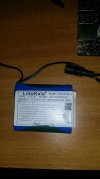
Testing the quality of a Converter Module Step Down from 12V to 5V needed by the FreeBSD tablet / mini-pc that I'm creating...

Hello.

What happens if I connect the male barrel jack to the connector of the little board that you see below ? is there some risk of explosion :D ?

I ask this because I want to power on indipendently (I mean not from the powerbank,but from the Liitokala battery pack showed below) the display used by my minipc / tablet that I'm trying to create and based on FreeBSD.

The goal of this experiment is to test the quality of the stepdown circuit.

What is what :

1) mini table fan : 5 watt

https://www.amazon.it/dp/B0CXXG1BXX

2) battery pack : (Liitokala battery pack ioni di litio 12V 3000mAh 12V 3A) :

https://it.aliexpress.com/item/32381410408.html

3) board : (EPLZON DC 6V 9V 12V 24V to DC 5V 5A Buck Converter Module V-36V Step Down to DC 5V-5.3V 5.2V 3.5-6AEPLZON DC 6V 9V 12V 24V to DC 5V 5A Buck Converter Module V-36V Step Down to DC 5V-5.3V 5.2V 3.5-6A)

https://www.amazon.it/dp/B0B58T2YY8

Check attachments.
 

Attachments

  • Screenshot_2025-02-27_22-00-11.jpg
    Screenshot_2025-02-27_22-00-11.jpg
    30.5 KB · Views: 359
  • Screenshot_2025-02-27_21-59-27.jpg
    Screenshot_2025-02-27_21-59-27.jpg
    32.7 KB · Views: 372
That buck board is OK. That will work for your needs. I dunno about the fan??? Inductive load are bad test for your project. Which is a psudo-phone..
Seeing how it is adjustable output voltage you should check out output with multimeter and adjust..
 
That buck board is OK. That will work for your needs. I dunno about the fan??? Inductive load are bad test for your project. Which is a psudo phone..
Seeing how it is adjustable output voltage you should check out output with multimeter and adjust..

Can you suggest me some little low cost device that I can power on using that step down circuit (with the LiitioKala battery pack) ?

I don't want to test it on some expensive device.
 
You should make a power budget for the devices you are using. Then figure how long you want to run them off batteries. That will give you an idea of you load and battery needs. Add reserve.

You want to test your circuit with a similar load. I cannot guess that part. Also how much reserve for power budget.

One you know your load you can pick a testing device.

Your fan should not explode the battery its just not ideal and not a similar load. It probably will work as long as it does not do more than 500mA on USB2.

You need to study how efficient your buck board is. There are several manufacturers of these buck boards and you might want to test some.
 
According with the display specs that I'm using in my mini-pc :


it seems that it typically uses 800 mA.

so. Can it be powered on with my buck board and the liitiokala battery pack without running the risk to burn it,in your opinion ?

I should use it with the USB 3.0 port,not USB 2.0...
 
ZioMario you really could use a crahscurs in basic electronics.
This book is in english, in electronic form, and ment for students at an university, but it's a very good book, very explaining, and all I can offer quickly:
Paul Horowitz, 'The Art Of Electronics'
For sure there are many others, also in italian, but from the bottom of my heart, by all what you're doing it couldn't hurt if you know at least the fundamentals of current and voltage - it's no rocketscience; you can learn what you need within a few hours.
With batterys I can help; but basics about voltage and current are required as given to have a reasonable talk.
 
Anyway,the hardware setup is completed :

Untitled.jpg


Now I need to create the 3D case and that could take a long time,since I never used a CAD software.
If someone wants to help...is appreciated...
 
This may sound dumb but I design backwards. I make stuff first then maybe put in CAD.

I like cardboard models. With some duct tape you can fashion something usable.

There is no wrong way. Do it for yourself first then worry about market appeal.

Prototypes are just for you. Make a repeatable build you like then think about putting it on paper.

Aluminum foil tape on the outside for stiffness. Conducts electricity so use carefully.

You could use painters tape on the monitor to avoid sticky residues.
 
You can even use fiberglass resin or other epoxies on cardboard to give it a real feel just like circuit boards do.. Stick your standoffs in the epoxy when gooey state.
 
You can even use fiberglass resin or other epoxies on cardboard to give it a real feel just like circuit boards do.. Stick your standoffs in the epoxy when gooey state.

I don't think cardboard is the solution,man. It is too fragile. It can't support the weight of the hardware components inside.
To play with resins ? Complicated, risky, dirty. Maybe i will start learning to use the easiest 3D tool all around : Sketchup. Or I will stick with Legos.

But finding someone that can build the 3d model of the enclosure for me ? I will tell him the sizes and he will work remotely standing inside his office ? Can't it be done ?

I need only the DXF or DWG file of the enclosure. I found some good 3D printing companies that can build the case like I want for a good price.

To be honest,I already have a basic 3D model of the enclosure. It should be modified only a little bit.
 
It's highly unlikely not to find an enclosure that's completely incapable to take your hardware; look for something oversize; and yes it takes hours browsing the large offers of enclosures in several shops, but believe me (I'm not only in CAD, I've done a lot searches on buyable enclosures, and designed the one or the other myself - I know what I'm talking):
If you never done CAD before it's way less effort than just to learn CAD alone; plus you have to design the box, of course; and it's not done with that at all by far. There is way more to know about how to design an enclosure that endures - how simple they may look; and if you want/need sell it, there are several other things needed to be respected like CE, IP and other things, but just to "paint some case"...
 
look for something oversize;

never. This is exactly what I hate. I want a device that has the minimum thickness possible. I want an hybrid between a mini-pc and a tablet. I have spent some money to find all the connectors that allows the hardware to stay inside a case that I found on a shop that sells the enclosure for the ROCKPro64 board : the "ROCKPro64 PLAYBOX Enclosure" :


Because I wanted to make only little modifications to it. I asked to creators if they have the 3D model of that case and they gave it to me. It is already on the market,so since I should only re-position the holes and widen height and length,also mine is almost ready to go in the market.
 
I don't think cardboard is the solution,man. It is too fragile. It can't support the weight of the hardware components inside.
We did build complete planes out of that stuff. Worked pretty well, too.

But you can learn to use epoxy, be advised to use gloves. And it can be thinned with alcohol.
 
I think it is woth learning FreeCad. It is probably the best free cad for 3d modeling. That is my opinion.

Dig in. It is not easy to make a 3-D model.
Blender has a much higher learning curve. I can't get used to it. I was trained on 3Dmax and I really miss it.
I have used Blender more for video editing than 3D. Weird but I find that interface intuitative.

Since you seem to want somebody to 'help' you do you have a sketch made? Designer supposed to guess stuff?
That is rule 101 if you want work done in my world.
Make a sketch and beg somebody to help you. (Oh yea and I need a Job and Item number to charge it to.)
 
Back
Top