starting command on startup

good day. I am bad at Freebsd and this issue is difficult for me. I want to start a python script on Freebsd startup but i have trouble accomplishing it. I read lots of guides on it and found i need to write a small script and put it in rc.d folder. I dont know how to write script properly so i copied one on the internet. Maybe the script is bad but it seems the system does not see it at all. So here is my scripts:

Code:
#!/bin/sh

# PROVIDE: radon

. /etc/rc.subr

name="radon"
start_cmd="${name}_start"
stop_cmd="${name}_stop"

radon_start() {
   echo "radon starting"
   # your commands here
   nohup python /python_scripts/old_v.py &
}

radon_stop() {
   echo "radon finished"
   # your commands here
}

run_rc_command "$1"

# eof

So i named this script "radon". First i put it in /usr/local/etc/rc.d and added to etc/r.conf a line "radon_enable="YES""
I also put cmd "chmod +x /usr/local/etc/rc.d/radon"

So after sturtup OS does not start my python script but it said: "not found etc/rc.d/radon". I assumed OS searched my sctript in "etc/rc.d" instead of "/usr/local/etc/rc.d". So i put my file there too and entered "chmod +x /etc/rc.d/radon". But nothing changes, on startup it still says "not found etc/rc.d/radon". I dont see "radon start" output on startup. I know i need to dig some manual deeper but i spend a few days trying to find the issue so i decided to ask for help. Maybe the script is written wrong but must it give some output about it?

My freebsd version is 13.2 release.
 
Is that script supposed to run as a service or are you only trying to run some arbitrary command at/after reboot?

For the latter BSD cron knows @reboot, see crontab(5), to run a service have a look at daemon(8) and the section about managing services in the handbook
I dont know how to write script properly so i copied one on the internet.
Don't ever do that. Read the related manpages and handbook entries, but don't just run random scripts from shady sources; especially if they are executed as root!
 
Are you sure of the error message?

python doesn't exist on my machine, it's python3.9.
And it's better to specify the full path: /usr/local/bin/python3.9
 
A few comments. To begin with, the mechanism you choose (a full rc.d service) will work, but it is overkill for just starting one program. For that, follow cracauer's or sko's advice. If in the future, you think this will grow to being able to control the service (like start and stop it at will), or having to run it at a particular time w.r.t. other startup services, then use the rc.d mechanism, but read about it to understand how it works.

Having said that: As you started with, your script belongs in /usr/local/etc/rc.d; don't put it in /etc/rc.d, that's for things the normal install creates. It can be made to work in /usr/local, promise!

You get an error, but the error seems truncated: I bet there was a "/" before the etc.

I think you are missing a line "load_rc_config..." in your rc file. All of mine have it, and I'm also running 13.2.

Finally, if python is installed normally, there will be an executable /usr/local/bin/python3, which is a softlink to the actual python version, /usr/local/bin/python3.9. But the path that is in use when rc.d files are being executed may not contain /usr/local executables. So as Emrion said, you're better off using an explicit file in your rc.d script. Even better idea: Modify your old_v.py script to have "#!/usr/local/bin/python..." as the first line, and mark it as executable. Now you can run your script directory. Whether the python version you use (in either place) should be python, python3 or python3.9 is a religious question: Do you want your script to continue running when you upgrade the python version for example to 3.10 just using the newer version? Do you want to explicitly stick to the current 3.9 version, so new versions don't introduce bugs? Your choice.
 
You can just stuff it into /etc/rc.local with no further decoration.
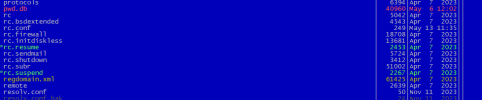
I cant find "rc.local" file in "etc", should i create it myself?
 

Attachments

  • rc.png
    rc.png
    15.4 KB · Views: 821
You can use it but I prefer to create a proper rc(8) script myself. Using an existing service script as an example is usually quite helpful. Have a look at net/py-wsdd for example, it is also a python script, its rc(8) script is fairly simple and self-explanatory.

Try this one:
Code:
#!/bin/sh

# PROVIDE: radon
# REQUIRE: DAEMON

. /etc/rc.subr

name="radon"
rcvar="${name}_enable"

load_rc_config ${name}

: ${radon_enable:="NO"}

command="/python_scripts/old_v.py"
procname="/usr/local/bin/python3.9"
pidfile="/var/run/${name}.pid"

start_cmd="${name}_start"

radon_start() {
   echo "Starting ${name}."
   /usr/sbin/daemon -S -p ${pidfile} ${command}
}

run_rc_command "$1"
 
/etc/rc.local might have to have executable permission to be working.
Strangely, it does not. That's because it is executed from /etc/rc.d/local, by using the "." command, which executes a script even if it does not have x permissions.

I wonder whether one would need to enable /etc/rc.d/local by setting local="YES" in rc.conf. Haven't had time to determine that by tracing the code, but it does seem to work fine on my system (13.2-RELEASE) without it.
 
1) Yes 2) No. But you can put logging statements into rc.local. I generally redirect all of rc.local's ouput to /var/log/rc_local.log
One thing I forgot to do initially was to mark rc.local as executable.

I simply put pdmenu in rc.local and got the msg pdmenu not found. When I set it to executable the msg disappeared but the program did not run. Should I expect it to?
 
One thing I forgot to do initially was to mark rc.local as executable.

I simply put pdmenu in rc.local and got the msg pdmenu not found. When I set it to executable the msg disappeared but the program did not run. Should I expect it to?

Maybe /usr/local/bin is not in $PATH?
 
Maybe /usr/local/bin is not in $PATH?
misc/pdmenu can't be run from /etc/rc.local, it requires a logged-in user.

Code:
Description:
    Pdmenu is a menuing system for Unix. It is designed to be easy to
    use, and is suitable for a login shell for inexperienced users, or
    it can just be ran at the command line as a handy menu.
I gave up trying to start pdmenu via rc.local and am now starting it in .profile.
pdmenu is executed when logging in, the login shell reading ~/.profile.
 
One thing I forgot to do initially was to mark rc.local as executable.

I simply put pdmenu in rc.local and got the msg pdmenu not found. When I set it to executable the msg disappeared but the program did not run. Should I expect it to?

I think that you have the add the full path of the script , not just the name
 
Back
Top