Linuxulator -> linux-rl9 -> Steam: Error: Steam needs to be online to update

Hi all BSD Steamers and Lunuxilators,

Since linux-nvidia-libs is still not defaulting to linux-rl9 (which is about time i guess :sssh:) I tried to compile it from ports with USES=linux:rl9 instead of USES=linux (which default to linux-c7)

It compiled fine and I made a package with make package then cd work/pkg; pkg add ./linux-nvidia-libs-550.127.05.pkg
Installation successful without any problems and finally I can run steam with /opt/steam-utils/bin/steam
(as suggested from https://github.com/shkhln/linuxulator-steam-utils)

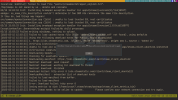
Now a new problem arrived. steam seems to not be able to contact the network: Error: Steam needs to be online to update. Please confirm your network connection and try again.

Any suggestion how can fix this? Or how to test if chroot into /compat/linux can access the outside network since I could not even find the ping command inside /compat/linux
 
Hi all BSD Steamers and Lunuxilators,

Since linux-nvidia-libs is still not defaulting to linux-rl9 (which is about time i guess :sssh:) I tried to compile it from ports with USES=linux:rl9 instead of USES=linux (which default to linux-c7)

It compiled fine and I made a package with make package then cd work/pkg; pkg add ./linux-nvidia-libs-550.127.05.pkg
Installation successful without any problems and finally I can run steam with /opt/steam-utils/bin/steam
(as suggested from https://github.com/shkhln/linuxulator-steam-utils)

Now a new problem arrived. steam seems to not be able to contact the network: Error: Steam needs to be online to update. Please confirm your network connection and try again.

Any suggestion how can fix this? Or how to test if chroot into /compat/linux can access the outside network since I could not even find the ping command inside /compat/linux
Can you reproduce it with steam built on version 20250208 from the port tree ?
And share the full logs from steam starting.

I am using steam with rl9 repository and I don't have any issue. Mind that I have an amd igpu, so I can't test for nvidia driver.
 
Can you reproduce it with steam built on version 20250208 from the port tree ?
And share the full logs from steam starting.

I am using steam with rl9 repository and I don't have any issue. Mind that I have an amd igpu, so I can't test for nvidia driver.
Yes.. Exactly same error messages on 20250208
 
What is the full log (including the command line to launch steam) ?
/usr/local/steam-utils/bin/steam

Code:
/home/archy/.steam/steam/ubuntu12_32/steam-runtime/run.sh: line 85: steam-runtime-identify-library-abi: command not found
run.sh[44259]: steam-runtime-identify-library-abi --ldconfig-paths failed, falling back to ldconfig
tid(44317) burning pthread_key_t == 0 so we never use it
[2025-03-06 12:32:07] Startup - updater built Jan 13 2024 00:51:43
[2025-03-06 12:32:07] Startup - Steam Client launched with: '/home/archy/.steam/steam/ubuntu12_32/steam'
ILocalize::AddFile() failed to load file "public/steambootstrapper_english.txt".
/tmp/dumps is not owned by us - delete and recreate
03/06 12:32:07 Init: Installing breakpad exception handler for appid(steam)/version(0)/tid(44317)
src/common/opensslconnection.cpp (1624) : unable to load trusted SSL root certificates
03/06 12:32:07 Init: Installing breakpad exception handler for appid(steam)/version(1.0)/tid(44317)
ExceptionHandler::GenerateDump waitpid failed:No child processes
03/06 12:32:07 Failed writing minidump, nothing to upload.
[2025-03-06 12:32:07] Loading cached metrics from disk (/home/archy/.steam/steam/package/steam_client_metrics.bin)
[2025-03-06 12:32:07] Failed to load cached hosts file (File 'update_hosts_cached.vdf' not found), using defaults
[2025-03-06 12:32:07] Using the following download hosts for Public, Realm steamglobal
[2025-03-06 12:32:07] 1. https://cdn.steamstatic.com, /client/, Realm 'steamglobal', weight was 1, source = 'baked in'
[2025-03-06 12:32:07] Verifying installation...
[2025-03-06 12:32:07] Unable to read and verify install manifest /home/archy/.steam/steam/package/steam_client_ubuntu12.installed
[2025-03-06 12:32:07] Verification complete
[2025-03-06 12:32:07] Downloading Update...
[2025-03-06 12:32:07] Checking for available update...
[2025-03-06 12:32:07] Downloading manifest: https://cdn.steamstatic.com/client/steam_client_ubuntu12
[2025-03-06 12:32:08] Manifest download: send request
[2025-03-06 12:32:08] Manifest download: waiting for download to finish
[2025-03-06 12:32:08] Manifest download: finished
[2025-03-06 12:32:08] Download failed: http error 0 (cdn.steamstatic.com/client/steam_client_ubuntu12)
[2025-03-06 12:32:08] DownloadManifest - exhausted list of download hosts
[2025-03-06 12:32:08] failed to load manifest from buffer.
[2025-03-06 12:32:08] Failed to load manifest
[2025-03-06 12:32:08] Error: Download failed: http error 0
[2025-03-06 12:32:08] Saving metrics to disk (/home/archy/.steam/steam/package/steam_client_metrics.bin)
[2025-03-06 12:32:08] Error: Steam needs to be online to update.     Please confirm your network connection and try again.
[2025-03-06 12:32:12] Shutdown
src/tier0/threadtools.cpp (3706) : Assertion Failed: Illegal termination of worker thread 'Thread(0x0x6e3180/0x0x27996ac0'
lsu-kill: No pid file found
 
Can you do
fetch https://cdn.steamstatic.com/client/steam_client_ubuntu12
And report like the 5 first lines, of the steam_client_ubuntu12 file
 
fetch https://cdn.steamstatic.com/client/steam_client_ubuntu12
./steam_client_ubuntu12
Code:
./steam_client_ubuntu12: ubuntu12: not found
./steam_client_ubuntu12: version: not found
./steam_client_ubuntu12: tenfoot_images_all: not found
tenfoot_images_all.zip.86419c7a56c12dd107b5e0d46f50c8a9b121f3cc: cannot open `tenfoot_images_all.zip.86419c7a56c12dd107b5e0d46f50c8a9b121f3cc' (No such file or directory)
size: 6582204: Failed to open: No such file or directory
./steam_client_ubuntu12: sha2: not found
./steam_client_ubuntu12: zipvz: not found
./steam_client_ubuntu12: sha2vz: not found
./steam_client_ubuntu12: steamui_websrc_all: not found
steamui_websrc_all.zip.2466f31ddf7c6bf4813e24481dfc2a4b7b0e30e7: cannot open `steamui_websrc_all.zip.2466f31ddf7c6bf4813e24481dfc2a4b7b0e30e7' (No such file or directory)
size: 30213727: Failed to open: No such file or directory
 
Run Steam with ktrace -di, then run kdump -H |& grep opensslconnection -B 500
Sure can.. What am I looking for?
ktrace -di /usr/local/steam-utils/bin/steam generates a "20M ktrace.out" but what will I do with that?
kdump -H |& grep opensslconnection -B 500 says something about "unable to load trusted SSL
"
Code:
16417 103444 steam    GIO   fd 2 wrote 86 bytes
"src/common/opensslconnection.cpp (1624) : unable to load trusted SSL r\
oot certificates"

Sorry, but not get your point here about what to do with that info?
 
Last edited:
I am having the same issue too.
 

Attachments

  • 2025-03-15-150339_1920x1080_scrot.png
    2025-03-15-150339_1920x1080_scrot.png
    298.2 KB · Views: 410
I am having the same issue too.
Good am not alone :)

Whats your specs?

Mine is:
OS: FreeBSD 14.2-RELEASE amd64
Uptime: 13 mins
Packages: 1487 (pkg)
Shell: zsh 5.9
Resolution: 3840x2160, 5504x2304, 3408x2130
DE: Cinnamon 5.4.9
WM: Mutter
WM Theme: Adwaita
Theme: Windows-10-Dark [GTK2/3]
Icons: elementary-xfce-dark [GTK2/3]
Terminal: sakura
Terminal Font: Ubuntu Mono,monospace 13
CPU: 13th Gen Intel i7-13700HX (24) @ 2.304GHz
GPU: AD106M [GeForce RTX 4070 Max-Q / Mobile]
Memory: 9830MiB / 40721MiB

On a Lenovo Legion Pro 5i i7/40/2000/4070/240Hz 16" laptop running in Dedicated GPU mode.
 
I am having the same issue too.
Hi,

Yes, I have the same issue. I did some investigation and the issue is related to SSL/TLS certificates of compatibility layer. To verify this, you can simply run /compat/linux/bin/wget <https://something>. You can see errors related to SSL/TLS.

I set up a virtual machine with Rocky Linux 9.5 and copied a few directories to the linux-rl9 compatibility layer, such as: /etc/crypto-policies, /etc/pki/ca-trust, /etc/pki/tls and /usr/share/pki. After that, /compat/linux/bin/wget started working over https, and therefore Steam itself also started working properly.
 
I set up a virtual machine with Rocky Linux 9.5 and copied a few directories to the linux-rl9 compatibility layer, such as: /etc/crypto-policies, /etc/pki/ca-trust, /etc/pki/tls and /usr/share/pki. After that, /compat/linux/bin/wget started working over https, and therefore Steam itself also started working properly.

Taking things a bit further:

Some files are just symlinks that are only valid on actual RL9. Here's the crypto ones I've found (the missing alsa/pulse stuff I cut could just be me missing a native package, idk.)

Code:
/compat/linux/etc:
$ ls -lR . | grep '^l'
lrwxr-xr-x  1 root wheel 42 Nov 12 08:07 crypto-policies -> /etc/crypto-policies/back-ends/krb5.config
lrwxr-xr-x  1 root wheel 40 Aug 21  2024 cacerts -> /etc/pki/ca-trust/extracted/java/cacerts
lrwxr-xr-x  1 root wheel    49 Aug 21  2024 cert.pem -> /etc/pki/ca-trust/extracted/pem/tls-ca-bundle.pem
lrwxr-xr-x  1 root wheel    50 Feb 11 14:06 fips_local.cnf -> /etc/crypto-policies/back-ends/openssl_fips.config
lrwxr-xr-x  1 root wheel 49 Aug 21  2024 ca-bundle.crt -> /etc/pki/ca-trust/extracted/pem/tls-ca-bundle.pem
lrwxr-xr-x  1 root wheel 55 Aug 21  2024 ca-bundle.trust.crt -> /etc/pki/ca-trust/extracted/openssl/ca-bundle.trust.crt
lrwxr-xr-x  1 root wheel 49 Aug 21  2024 cert.pem -> /etc/pki/ca-trust/extracted/pem/tls-ca-bundle.pem
lrwxr-xr-x  1 root wheel 18 Aug 21  2024 certs -> /etc/pki/tls/certs
lrwxr-xr-x  1 root wheel 28 Aug 21  2024 ct_log_list.cnf -> /etc/pki/tls/ct_log_list.cnf
lrwxr-xr-x  1 root wheel 24 Aug 21  2024 openssl.cnf -> /etc/pki/tls/openssl.cnf

Trying to poach these files from an RL9 VM, I'm completely lost in the weeds with all the symlinks, double symlinks and renamed symlinks. For example: /compat/linux/etc/krb5.conf.d/crypto-policies -> /etc/crypto-policies/back-ends/krb5.config, which on actual RL9 then points to /usr/share/crypto-policies/DEFAULT/krb5.txt, which cp -Lr can't seem to follow because of the rename. I tried copying everything manually, but it's so convoluted that I can hardly keep it straight.

dvt__, could you elaborate on your copying process?
 
Taking things a bit further:

Some files are just symlinks that are only valid on actual RL9. Here's the crypto ones I've found (the missing alsa/pulse stuff I cut could just be me missing a native package, idk.)

Code:
/compat/linux/etc:
$ ls -lR . | grep '^l'
lrwxr-xr-x  1 root wheel 42 Nov 12 08:07 crypto-policies -> /etc/crypto-policies/back-ends/krb5.config
lrwxr-xr-x  1 root wheel 40 Aug 21  2024 cacerts -> /etc/pki/ca-trust/extracted/java/cacerts
lrwxr-xr-x  1 root wheel    49 Aug 21  2024 cert.pem -> /etc/pki/ca-trust/extracted/pem/tls-ca-bundle.pem
lrwxr-xr-x  1 root wheel    50 Feb 11 14:06 fips_local.cnf -> /etc/crypto-policies/back-ends/openssl_fips.config
lrwxr-xr-x  1 root wheel 49 Aug 21  2024 ca-bundle.crt -> /etc/pki/ca-trust/extracted/pem/tls-ca-bundle.pem
lrwxr-xr-x  1 root wheel 55 Aug 21  2024 ca-bundle.trust.crt -> /etc/pki/ca-trust/extracted/openssl/ca-bundle.trust.crt
lrwxr-xr-x  1 root wheel 49 Aug 21  2024 cert.pem -> /etc/pki/ca-trust/extracted/pem/tls-ca-bundle.pem
lrwxr-xr-x  1 root wheel 18 Aug 21  2024 certs -> /etc/pki/tls/certs
lrwxr-xr-x  1 root wheel 28 Aug 21  2024 ct_log_list.cnf -> /etc/pki/tls/ct_log_list.cnf
lrwxr-xr-x  1 root wheel 24 Aug 21  2024 openssl.cnf -> /etc/pki/tls/openssl.cnf

Trying to poach these files from an RL9 VM, I'm completely lost in the weeds with all the symlinks, double symlinks and renamed symlinks. For example: /compat/linux/etc/krb5.conf.d/crypto-policies -> /etc/crypto-policies/back-ends/krb5.config, which on actual RL9 then points to /usr/share/crypto-policies/DEFAULT/krb5.txt, which cp -Lr can't seem to follow because of the rename. I tried copying everything manually, but it's so convoluted that I can hardly keep it straight.

dvt__, could you elaborate on your copying process?
Hi,

I copied using the "follow link" option in midnight commander.
 
Thanks.

Think I might have it now. Copied those directories (plus /etc/ssl) via midnight commander with "Follow links" and overwrote the corresponding /compat/linux directories using rsync -rvahc. Steam now works for me.

https://github.com/shkhln/linuxulator-steam-utils/issues/148 indirectly pointed me to the missing link, as it was still erroring out until I copied over /etc/ssl.

I've notified the maintainer emulation@FreeBSD.org of these invalid symlinks, though I'm unsure of the proper etiquette around this.
 
Tried it copying from fresh Rocky 9.5 minimal VM with "mc" and "follow link" option. Did not help for me. Or maybe I do it wrong.
If you guys made it, can we have a step by step instruction.

What mean "............and overwrote the corresponding /compat/linux directories using rsync -rvahc"?
 
Here's my step-by-step from memory (read WARNING below first though):

1. install RL9 VM (in my case on Linux laptop)
2. using mc, copy over the following directories to some other directory (I used the home directory for root) with the follow-link option: /etc/crypto-policies, /etc/pki/ca-trust, /etc/pki/tls, /usr/share/pki, /etc/ssl
3. get those folders off the VM (I mounted the qcow2; easier to use rsync over the network but I didn't want to enter my system password into the VM)
4. I also had to chown -R them to my username so I didn't need root privileges to copy around on my laptop (though obviously you'll need privileges to overwrite later)
5. get those folders over to your freebsd box
6. overwrite the corresponding /compat/linux directories, for which I used rsync -rvahc (it checks the file signatures, and copies over if they don't match); for example, rsync -rvahc ca-trust /compat/linux/etc/pki, which will over-write the contents of /compat/linux/etc/pki/ca-trust. Do this for all listed directories in step 2.
7. worked for me (I had screwed up earlier trying to get this right and had to reinstall all the linuxulator packages, so be careful)

WARNING:
1. this is a band-aid for a broken linux-rl9-ca-certificates package
2. they seem to have fixed this after I notified them, see https://cgit.freebsd.org/ports/commit/?id=1bae5e0ce3a928706b55683f661820967f36b7cc and https://www.portsfallout.com/fallout/1117415/ ; double-check you have the latest packages
3. when I next updated, it wouldn't go through until I deleted one of the directories/files due to some conflict; sorry, don't remember which one

Steam then proceeded to break for an unrelated and unknown reason, so between that and a few other frustrations, I'm back on Debian. (Still have a VM and RasPi, but won't be daily driving for awhile.)
 
Back
Top