Is there a way to have text above video? Preferrably in a tty/framebuffer

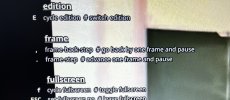
I use mpv video player, even in a console tty, when you hit ? there is a text overlay showing the help text while the video is playing beneath. Is there a way to overlay a program such as console or other programs (a text oriented browser, a pdf viewer etc) on top of a console playing video?

Something like that in the picture.
 

Attachments

  • IMG_6601.jpeg
    IMG_6601.jpeg
    1.3 MB · Views: 19
*headscratch* I'm not quite sure I understood right what you're going to achieve, but my first idea was to use a borderless terminal window with a tranparent background you lay over the window playing the movie.
 
*headscratch* I'm not quite sure I understood right what you're going to achieve, but my first idea was to use a borderless console with a tranparent background you lay over the window playing the movie.
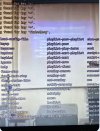
I want something like this, to watch video in the backround with a system console in front for example.

Can this be done directly in the framebuffer, without starting up a window manager or a gui?

In the picture i am watching a video using mpv in the console, without starting up a display server, and have activated the mpv console.

Now i ask how to do the same but with a system console for example instead of mpvs console.

How does mpv render video directly on console/framebuffer?

I know mpv console is hardcoded in the program itself, but maybe through some programming the thing i am talking about could be done.
 

Attachments

  • IMG_6604.jpeg
    IMG_6604.jpeg
    477.6 KB · Views: 14
Then what I said was one way to do it:
Start in one terminal window mpv in fullscreen mode (trivial), then start another terminal window, borderless if you like (xterm in fullscreen mode for example), with a transparent background over it. You may use a short sleep between those actions, so the second does not become the first.
Depening on the WM/DE you're using, transparency is given (xterm cannot do transparency; if you use xterm, you need the WM to make the window tranparent, or use antother terminal emulator that provides it.) So check the DE/WM's manual how to open self defined windows.
If not, transparency can be reralized easily with an additional program install for X. I played a bit with it a couple of years ago, works pretty fine, easy to use, but alas I forgot its name, since I don't use transparency myself: It looks cool, but it highly confuses me; personally I simply cannot work on text, especially not code, when the background ain't monotonic, but being a picture - especially a moving picture was impossible for me to do any efficient writing over it.

 
If your WM does not support certain things ("fiddle-faddle") like transparency, you need a compositor.
An old outcommented line in my .xinitrc is picom &, so it seems I used picom back then.
 
Back
Top