Hello all,
I'm trying to update one of my NAS boxes to test running it on 15.1. I am currently running zVault, which is based on the FreeBSD 13.3.
So I was following vermaden's blog post, which is from 2021, but seemed to be reasonable. Basically, it calls for creating a new boot environment, mount it somewhere, and then untar the base.tgz, kernel.tgz, and lib32.tgz tarballs into this dataset. I copy over files from the current BE, activate the new BE ("default"), and reboot. When I do the reboot, it gets to the bootloader, and then hangs at the
I almost feel as if I missed some setting, but have no idea where it would be. So if I cannot get this to work, my next option would be to build 15.1 on a separate hard drive, pull the old drive, and then start using the new one. Is a different hard drive the best approach or is there a way to get the new BE on the original disk doable?
I'm trying to update one of my NAS boxes to test running it on 15.1. I am currently running zVault, which is based on the FreeBSD 13.3.
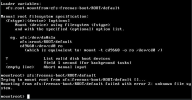
So I was following vermaden's blog post, which is from 2021, but seemed to be reasonable. Basically, it calls for creating a new boot environment, mount it somewhere, and then untar the base.tgz, kernel.tgz, and lib32.tgz tarballs into this dataset. I copy over files from the current BE, activate the new BE ("default"), and reboot. When I do the reboot, it gets to the bootloader, and then hangs at the
mountroot> prompt. When I enter the path to the BE at the prompt (zfs:freenas-boot/ROOT/default), however it fails yet again, as in the attached image. I almost feel as if I missed some setting, but have no idea where it would be. So if I cannot get this to work, my next option would be to build 15.1 on a separate hard drive, pull the old drive, and then start using the new one. Is a different hard drive the best approach or is there a way to get the new BE on the original disk doable?