FreeBSD doesn't detect my D-Link DWA-172 Wi-Fi adapter!

I bought recently (likely on 2 weeks) a D-Link DWA-172 for Wi-Fi because my Realtek RTL8821CE detects Wi-Fi but not connects to any Wi-FI and dhclient says "No carrier............... get out" I searched something and i found some info that my Realtek RTL8821CE is "supported" for FreeBSD on the wiki "https://wiki.freebsd.org/WiFi/Rtw88". All help is appreciated thanks.
 
I have no idea what chipset that D-Link uses. But you mention RTL8821CE too. So which one do you need help with?
 
If the wireless network isn't associated everything else isn't going to work either. So focus on the association first.
My /etc/rc.conf:
Code:
wlans_rtw880="wlan0"
ifconfig_wlan0="WPA SYNCDHCP"
My /etc/wpa_supplicant:

Code:
network={        
        ssid="myssid" 
        psk="mypassword" 
}
This code have some issue?
 
Yeah RTL8821CE detects wifi but dhcp fails on connect
Does the accesspoint / router perhaps has a "Allowed devices" setting activated?

If this is the case, without explicitly the device allowed (usually by MAC address), the device won't get an IP by the DHCP server.


I bought recently ... a D-Link DWA-172 for Wi-Fi
Searching on Windows detects my adaptor with "Realtek 8811CU" name is that supported?
Currently there is one D-Link DWA-172 supported by device ID (0x3318):

/usr/src-14.2/sys/dev/usb/usbdevs
Code:
  1730: product DLINK DWA172A1          0x3318  DWA-172 rev A1

Check your devices product id. Execute usbconfig, look for unit.addr, then dump the device description, look out for "idProduct", also, post output.

Example, here the unit.addr is ugen0.2 or 0.2:
Rich (BB code):
 % usbconfig
ugen0.2: <WIS09ABGN LinkStick Wireless LAN Adapter Samsung Electronics Co., Ltd> at usbus0, cfg=0 md=HOST spd=HIGH (480Mbps) pwr=ON (450mA)

% usbconfig -d 0.2 dump_device_desc
ugen0.2: <WIS09ABGN LinkStick Wireless LAN Adapter Samsung Electronics Co., Ltd> at usbus0, cfg=0 md=HOST spd=HIGH (480Mbps) pwr=ON (450mA)

  bLength = 0x0012
  bDescriptorType = 0x0001
  bcdUSB = 0x0200
  bDeviceClass = 0x0000  <Probed by interface class>
  bDeviceSubClass = 0x0000
  bDeviceProtocol = 0x0000
  bMaxPacketSize0 = 0x0040
  idVendor = 0x04e8
  idProduct = 0x2018
  bcdDevice = 0x0101
  iManufacturer = 0x0001  <Ralink>
  iProduct = 0x0002  <802.11 n WLAN>
  iSerialNumber = 0x0003  <1.0>
  bNumConfigurations = 0x0001

If the product id is different than the supported, it can be added.
 
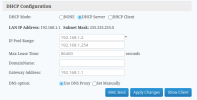
Does the accesspoint / router perhaps has a "Allowed devices" setting activated?
Screenshot_20250318_155649_Samsung Internet.jpg
No
 
Searching on Windows detects my adaptor with "Realtek 8811CU" name is that supported?
Rich (BB code):
idProduct = 0xc811
That device, according to the data, is supported.

/usr/src-14.2/sys/dev/usb/usbdevs
Rich (BB code):
4100 product REALTEK RTW8821CU       0xc811  RTW8821CU

/usr/src-14.2/sys/contrib/dev/rtw88/rtw8821cu.c
Rich (BB code):
24         { USB_DEVICE_AND_INTERFACE_INFO(RTW_USB_VENDOR_ID_REALTEK, 0xc811, 0xff, 0xff, 0xff),
25           .driver_info = (kernel_ulong_t)&(rtw8821c_hw_spec) }, /* 8811CU */


Which device are you trying to associate with the access point, the D-Link or the RTL8821CE?


In rc.conf the rtw88 is configured, take note of the following loader tunable: rtw88(4)
Rich (BB code):
LOADER TUNABLES
     compat.linuxkpi.skb.mem_limit
             If you are running a 64bit system with more than 4GB of main
             memory you need to set this tunable to 1 in loader.conf(5) and
             reboot once to make it effective.  This tunable will work around
             a problem with DMA and limit allocations for network buffer
             memory to the lower 32bit of physical memory and make the driver
             work.


dmesg(8) could be useful as well.
 
RTL8821CE doesnt work for me
If you know how to replace the wifi card, I'd suggest swapping it out for an Intel-branded one. Intel 8625 AC is a good bet. And yep, it needs to be an Intel-branded wifi card.

Reason being - I had 2 laptops with RTL8821CE, and I could never get that to work. But one of the laptops was possible to take apart, so I swapped in an Intel 8625 AC, and it worked like a charm.

BTW, FreeBSD only supports G-speeds right now. When 15-RELEASE comes out in December this year, FreeBSD has plans to support N-speeds (which are about 3 times as fast as G-speeds).

HTH
 
I don't see anything wrong in the screenshot. I think it may be the hardware driver. What's the output of pciconf -lv | grep -B4 network? The network device listed in that manner will be detected by ifconfig.
 
Back
Top