UFS vs ZFS

ZFS isn't about being useful to people that make use of "most of the features" (I would find it surprising to find anyone that uses most of the features on any single system), but it gets core integrity and snapshotting features right at its foundations. This makes it useful even on single disk setups (you can even use the copies parameter to have a single-disk RAID1-like setup, configurable per-dataset).

It's rather wonderful being able to know in no uncertain terms if a file is corrupted or not. Throw boot environments in, and I'd say it's hard to justify UFS over ZFS on any system with ≥4GB of RAM.
 
ZFS ... gets core integrity and snapshotting features right at its foundations.
THIS.

Checksums on everything. RAID built into the file system (where it belong). For a file system containing valuable data, where loss of the file system would be a big hassle, this is invaluable. All the other things (boot environments, enlarging file systems, ...) are nice little conveniences, but I can live without them (at a loss of convenience). Data security I don't want to live without.
 
Uhm no? You got that the wrong way around. But apart from that, yes, sendfile() is meant as an optimization.
Yes, I got that backwards. Thanks for the correction.

What it does is send some file, optionally adding header and/or footer data (so it's easy to wrap it into a whole protocol message, for example a HTTP response). It will always do that, no matter which filesystem you use.
Huh? As far as I know, sendfile(2) is completely protocol-agnostic. I know for a fact Kafka uses its own protocol, and no changes were needed to make it work.

But the real purpose of using it is performance by avoiding any copies (the kernel should read the file to the buffer that is also used for sending it out the socket without even copying anything to userspace). This only works with a filesystem that allows this tight integration.
Yes, and this can make a big difference for certain high-throughput workloads. Kafka is one example.
To understand the impact of sendfile, it is important to understand the common data path for transfer of data from file to socket:
  1. The operating system reads data from the disk into pagecache in kernel space
  2. The application reads the data from kernel space into a user-space buffer
  3. The application writes the data back into kernel space into a socket buffer
  4. The operating system copies the data from the socket buffer to the NIC buffer where it is sent over the network
This is clearly inefficient, there are four copies and two system calls. Using sendfile, this re-copying is avoided by allowing the OS to send the data from pagecache to the network directly. So in this optimized path, only the final copy to the NIC buffer is needed.
Varnish is another example. I'm guessing Nginx uses it as well, and that's why we have Netflix to thank for the improvements to that syscall in Freebsd.
 
Huh? As far as I know, sendfile(2) is completely protocol-agnostic.
It is. See sendfile(2) (the man-page) that explains the feature of optional headers/trailers. Without that feature, to e.g. send a file in a HTTP response, the server would first need to write all the response headers using "normal" write()/send() functions and then use sendfile() to send the actual body. Of course this would work, but needs one more syscall (switching to kernel and back to userspace while copying data), and might even lead to sending out more TCP packets than strictly needed ... so it's just yet another optimization, making sendfile(2) here both a bit easier to use and more flexible.

Yes, and this can make a big difference for certain high-throughput workloads.
Sure, I just say they're relatively rare. To make a difference in practice, sending files directly from disk "as is" must be absolutely prevalent in your communication and you must have lots of it.

Also note that sendfile() has an inherent limitation (which is just part of the concept of course): It can't be used if you need to apply some "transfer encoding" (e.g. because of some "8bit unclean" protocol, or because you want to apply on-the-fly compression, ...). So
I'm guessing Nginx uses it as well
I wonder how useful this is in practice? For web servers, it's best practice to always compress any response body (typically either deflate, gzip or brotli). Well, you *could* of course have the compressed files ready on disk ?
 
Also note that sendfile() has an inherent limitation (which is just part of the concept of course): It can't be used if you need to apply some "transfer encoding" (e.g. because of some "8bit unclean" protocol, or because you want to apply on-the-fly compression, ...)
On-the-fly transcoding is mostly useful for Netflix or live registration databases... For static content, it's better practice to have a local compressed copy, and let the client / browser figure out how to decompress it.
 
On-the-fly transcoding is mostly useful for Netflix or live registration databases... For static content, it's better practice to have a local compressed copy, and let the client / browser figure out how to decompress it.
HTTP negotiates the compression used (Accept-Encoding header). You might want to have multiple versions of the files then, if you want to support any browser, and of course you still need the uncompressed version for clients that don't implement compression.

edit: a better strategy for a webserver wanting to benefit from sendfile() for static content would probably be to just cache the compressed versions to disk itself.
 
I tested a rsync copy from a ZFS RAID10 array to a single drive with formatted UFS and then ZFS. According to my tests, ZFS is faster. On large files with ZFS I get 190MB/s constantly and with UFS 150MB/s. On smaller files I got a max of 50MB/s on UFS and around 80MB/s with ZFS.

Excepting this on zfs you got datasets, lz4 compression if you plan to use it just as a filesystem and not creating any 'raid' arrays.
If you plan to use it also to create 'raid' arrays... you got plenty of other goodies... for example I have a 'raid10' equivalent... paired with a ssd for caching (ARC/SLOG)... is pretty awesome. I have this setup for over 3y, 0 problems.
 
… ARC/L2ARC …

… low-end flash (USB thumb drives) as L2ARC for a notebook with 16 GB memory. Very pleasing. …

More recently, two thumb drives with an HP ZBook 17 G2 with 32 GB memory (and hard disk drives). L2ARC is a joy.

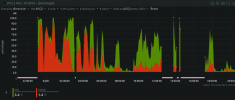
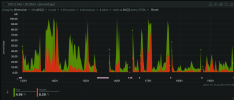
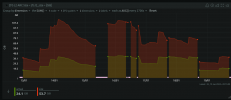
Charted hits for the past day (first screenshot) are much lower than usual, because I spent much time on unusual activities such as updating base from source, and repeatedly upgrading large numbers of packages. Generally: activitites that get relatively little value from L2ARC in my case.

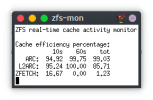
The second shot, zfs-mon, is more indicative of the effiency that I usually get. ZFS rocks.

I'll add output from zpool iostat -v 10

Postscript (2024-01-19)

Code:
% zpool iostat -v 10
                       capacity     operations     bandwidth
pool                 alloc   free   read  write   read  write
-------------------  -----  -----  -----  -----  -----  -----
august                493G   419G     15     28   248K   951K
  ada1p3.eli          493G   419G     15     28   248K   951K
cache                    -      -      -      -      -      -
  gpt/cache2-august  14.3G   133M      7      1  86.9K   310K
  gpt/cache1-august  28.7G   121M     16      1   162K   320K
-------------------  -----  -----  -----  -----  -----  -----
                       capacity     operations     bandwidth
pool                 alloc   free   read  write   read  write
-------------------  -----  -----  -----  -----  -----  -----
august                493G   419G     20     32   550K   664K
  ada1p3.eli          493G   419G     20     32   550K   664K
cache                    -      -      -      -      -      -
  gpt/cache2-august  14.3G   133M      7      2   403K   463K
  gpt/cache1-august  28.7G   121M     13      2   602K   351K
-------------------  -----  -----  -----  -----  -----  -----
                       capacity     operations     bandwidth
pool                 alloc   free   read  write   read  write
-------------------  -----  -----  -----  -----  -----  -----
august                493G   419G     55     21   854K   391K
  ada1p3.eli          493G   419G     55     21   854K   391K
cache                    -      -      -      -      -      -
  gpt/cache2-august  14.3G   134M     11      2   552K   521K
  gpt/cache1-august  28.7G   121M     20      2  1.01M   585K
-------------------  -----  -----  -----  -----  -----  -----
                       capacity     operations     bandwidth
pool                 alloc   free   read  write   read  write
-------------------  -----  -----  -----  -----  -----  -----
august                493G   419G     33     25  1.00M   405K
  ada1p3.eli          493G   419G     33     25  1.00M   405K
cache                    -      -      -      -      -      -
  gpt/cache2-august  14.3G   133M     49      2  2.33M   503K
  gpt/cache1-august  28.7G   122M     77      2  3.69M   745K
-------------------  -----  -----  -----  -----  -----  -----
                       capacity     operations     bandwidth
pool                 alloc   free   read  write   read  write
-------------------  -----  -----  -----  -----  -----  -----
august                493G   419G     18     20   907K   320K
  ada1p3.eli          493G   419G     18     20   907K   320K
cache                    -      -      -      -      -      -
  gpt/cache2-august  14.3G   133M     56      1  2.74M   616K
  gpt/cache1-august  28.7G   122M     83      1  4.23M   435K
-------------------  -----  -----  -----  -----  -----  -----
                       capacity     operations     bandwidth
pool                 alloc   free   read  write   read  write
-------------------  -----  -----  -----  -----  -----  -----
august                493G   419G     28     26  1.18M   390K
  ada1p3.eli          493G   419G     28     26  1.18M   390K
cache                    -      -      -      -      -      -
  gpt/cache2-august  14.3G   134M     30      2  1.44M   621K
  gpt/cache1-august  28.7G   122M     48      2  2.37M   525K
-------------------  -----  -----  -----  -----  -----  -----
                       capacity     operations     bandwidth
pool                 alloc   free   read  write   read  write
-------------------  -----  -----  -----  -----  -----  -----
august                493G   419G     18     33   646K   764K
  ada1p3.eli          493G   419G     18     33   646K   764K
cache                    -      -      -      -      -      -
  gpt/cache2-august  14.3G   135M     49      2  1.96M   572K
  gpt/cache1-august  28.7G   122M     82      2  3.37M   502K
-------------------  -----  -----  -----  -----  -----  -----
                       capacity     operations     bandwidth
pool                 alloc   free   read  write   read  write
-------------------  -----  -----  -----  -----  -----  -----
august                493G   419G     22     21   956K   316K
  ada1p3.eli          493G   419G     22     21   956K   316K
cache                    -      -      -      -      -      -
  gpt/cache2-august  14.3G   134M     60      2  2.58M  1.06M
  gpt/cache1-august  28.7G   123M    116      2  5.03M   418K
-------------------  -----  -----  -----  -----  -----  -----
                       capacity     operations     bandwidth
pool                 alloc   free   read  write   read  write
-------------------  -----  -----  -----  -----  -----  -----
august                493G   419G     26     20   910K   288K
  ada1p3.eli          493G   419G     26     20   910K   288K
cache                    -      -      -      -      -      -
  gpt/cache2-august  14.3G   133M     39      2  1.90M   567K
  gpt/cache1-august  28.7G   122M     60      1  2.92M   332K
-------------------  -----  -----  -----  -----  -----  -----
                       capacity     operations     bandwidth
pool                 alloc   free   read  write   read  write
-------------------  -----  -----  -----  -----  -----  -----
august                493G   419G      6     35   156K  1.17M
  ada1p3.eli          493G   419G      6     35   156K  1.17M
cache                    -      -      -      -      -      -
  gpt/cache2-august  14.3G   136M      0      2  31.6K  1.20M
  gpt/cache1-august  28.7G   123M      1      2  56.4K   303K
-------------------  -----  -----  -----  -----  -----  -----
                       capacity     operations     bandwidth
pool                 alloc   free   read  write   read  write
-------------------  -----  -----  -----  -----  -----  -----
august                493G   419G      0     19  4.39K   259K
  ada1p3.eli          493G   419G      0     19  4.39K   259K
cache                    -      -      -      -      -      -
  gpt/cache2-august  14.3G   137M      0      1      0   165K
  gpt/cache1-august  28.7G   123M      0      1    408   103K
-------------------  -----  -----  -----  -----  -----  -----
 

Attachments

  • 1704401586400.png
    1704401586400.png
    108.1 KB · Views: 380
  • 1704401900068.png
    1704401900068.png
    9.4 KB · Views: 349
  • 1705694188389.png
    1705694188389.png
    114 KB · Views: 346
  • 1705694293043.png
    1705694293043.png
    70.2 KB · Views: 352
Last edited:
I'm testing both ZFS and UFS2 VM's on a Linux QEMU/KVM machine. It's really nice to see ZFS working after mounting the qcow2 file. Linux doesn't really support writing to UFS2.
 
Data corruption is not a big problem for many situations and use cases as long as it stays within limits.
The reason Netflix content cache appliances use one UFS file system per drive instead of ZFS (or any other RAID / volume management) is that they run at the edge of what the hardware can do and can tolerate failures up to and including data corruption (to a point).
It's a distributed cache and the video container formats have their own checksums.
If we look at windows server, macOS, Android. Those systems don't use file systems as resistant to data corruption as ZFS either.
And yet they are very popular operating systems..

What's also interesting. Despite the largescale nature of IT today, it is not really researched by large companies which file system leads to the most corrupt files in the long run, has the least fragmentation, best maintains its performance over a long time, remains the most stable over the years under heavy load.

If you go looking for reliable research regarding these topics you are going to find that there is very little large-scale, independent and highly funded literature to be found.
Instead, companies are more likely to engage in privacy abuses (Microsoft/Apple/Facebook/Avast/...).
Also, the most flawed programming languages are made the norm.
And then you have the many companies sitting around developing software for things for which perfectly working open-source alternatives have existed for decades. (Adobe, Jetbrains, Snowflake, Veeam, ..)

I have not done any scientific research, but this is my impression after having used FreeBSD (ZFS) and OpenBSD (UFS) as daily drivers for years.
For desktop use, it makes little difference which of the two file systems you use.
I have never seen corrupt files with either file system. UFS did not give any problems after power failures, it automatically fixed the filesystem after a reboot.

In terms of performance, I think it depends on the specific workload which one is going to be the fastest.

That you need 8GB of RAM for ZFS is also a myth. On the desktop, you can use ZFS just fine if you use 4GB of RAM.
I have done this for years without ever experiencing a problem.

There are certain useful features of ZFS such as compression and snapshots. For desktop use, ZFS snapshots also makes little difference.
If I use rsync to do monthly backups to a 20-year-old HDD, it almost never takes more than 90 seconds, so it's fast and convenient as well (for desktop usage).

 
I was tempted to use ZFS on my NAS, but I have 8GB RAM, and a 10TB drive. I've heard ZFS generally required 1GB RAM per TB of HDD space, but even if 10TB would still be fine in 8GB RAM, I also run a small web server. ZFS feels like a better use-case vs UFS for a NAS drive but I'm not quite into the idea of having to fine-tune it manually for this set-up.

Generally speaking, I haven't had data loss in years (ext2/4, XFS, NTFS), and know drives fail. I trust UFS works no-nonsense single-drive, and believe that ZFS is only interesting for the data integrity benefits and RAID.

I 100% don't need snapshots or rollback. Something breaks, I reinstall. I haven't had anything break in years and never had to use snapshot/rollback :p The idea of CoW or extra stuff being written to my SSD as a "just-in-case" recovery method isn't ideal to me. My NVMe needs to blaze full-speed in the moment :p (didn't buy it to be slow with recovery)

And with early FreeBSD messing around on my laptop, I broke boot and went to a Linux LiveUSB. UFS needed a manual mount command, but mounted fine. ZFS couldn't be mounted, and at that point I couldn't recover anything (that one BSD-specific LiveUSB image is silly-enough to not fit on common 4GB drives).
 
And with early FreeBSD messing around on my laptop, I broke boot and went to a Linux LiveUSB. UFS needed a manual mount command, but mounted fine. ZFS couldn't be mounted, and at that point I couldn't recover anything (that one BSD-specific LiveUSB image is silly-enough to not fit on common 4GB drives).
For recovery, I can suggest a basic image that does fit onto a 4GB drive - even that will come with an installer and a live shell that you can use to do the recovery.
 
Data corruption is not a big problem for many situations and use cases as long as it stays within limits.
Indeed, some people don't care. And there are cases where corruption can be detected at higher levels.

If we look at windows server, macOS, Android. Those systems don't use file systems as resistant to data corruption as ZFS either.
The windows file system (ReFS) uses both checksums and CoW. The Apple file system uses checksums at least for metadata, and I don't know about its allocation and data placement method.

What's also interesting. Despite the largescale nature of IT today, it is not really researched by large companies which file system leads to the most corrupt files in the long run, has the least fragmentation, best maintains its performance over a long time, remains the most stable over the years under heavy load.
It is heavily researched and optimized. But it is not published much. Today there are really three kinds of storage software stacks used in production: (a) What is provided for free in open OSes, such as ext4, XFS, ZFS and UFS. Since Linux has a very high market share in server deployments, some of these are heavily used. But there is little academic work comparing them, as it is highly workload and situation dependent. (b) Commercial file systems that are often proprietary and supported; the territory where these are deployed heavily is HPC; contenders include Spectrum Scale (GPFS), Tintri/Lustre, Ceph, and so on. (c) The storage stacks used by the FAANG hyperscalers, which are typically scratch built and deeply integrated into their systems. Categories b and c are neither accessible to small users, nor are performance studies published, other than as marketing white papers of dubious value.

Instead, companies are more likely to engage in privacy abuses ...
Also, the most flawed programming languages are made the norm.
The usual anti-commercial paranoia.

For desktop use, it makes little difference which of the two file systems you use.
I have never seen corrupt files with either file system.
One individual user, with one or two disks is not statistically significant.

Generally speaking, I haven't had data loss in years (ext2/4, XFS, NTFS), and know drives fail. I trust UFS works no-nonsense single-drive, and believe that ZFS is only interesting for the data integrity benefits and RAID.
"Only interesting for" is a strange statement. You write data to disk, and you don't seem to care much whether it can be read back.

Something breaks, I reinstall. I haven't had anything break in years and never had to use snapshot/rollback :p The idea of CoW or extra stuff being written to my SSD as a "just-in-case" recovery method isn't ideal to me. My NVMe needs to blaze full-speed in the moment :p (didn't buy it to be slow with recovery)
Two comments. First, I very much doubt that you are even capable of using the blazing speed of your NVMe device, without some serious optimization of the stack. It would be interesting to measure whether "CoW or extra stuff being written" would actually cause a slowdown at all for you.

Second, consider the availability cost of your recovery method, reinstalling. Say you have to spend one day every 2-3 years to reinstall. That's roughly one part in 1000, if you count the days. So your system can't get a better availability than 3 nines, simply based on your recovery technique. My educated guess is that using simple mirroring on your system would give you 5 to 6 nines, and a lot less work. On the other hand, you may not even need such high availability.
 
Second, consider the availability cost of your recovery method, reinstalling. Say you have to spend one day every 2-3 years to reinstall. That's roughly one part in 1000, if you count the days. So your system can't get a better availability than 3 nines, simply based on your recovery technique.

Eh I like the work :p Doing clean installs keeps me up-to-date with em, and I probably reinstall at least once a week while I'm trying to test different things for whatever reason (already did 3 this week and planning on another later today)

Two comments. First, I very much doubt that you are even capable of using the blazing speed of your NVMe device, without some serious optimization of the stack. It would be interesting to measure whether "CoW or extra stuff being written" would actually cause a slowdown at all for you.
CoW/extra stuff realistically doesn't affect my performance (pretty impressed!), but at the same time I'm pretty sure that isn't coming for free hardware/resources-wise, and any calculations coming from that could probably be put towards other stuff like game FPS/latency or lowering my electricity usage/bill by not being there :p

I even entertained ext2 root on NVMe for a bit on Linux this year and didn't see a difference; was still fast, and no known data issues. I typically use XFS because it sounds good on-paper, or ext4 with nobarrier, but basically I like to assume any modern filesystem isn't a concern for single-drive data integrity unless you improperly unmount it frequently (hard crashes or not a battery-backed laptop).

ZFS to me feels like extra data integrity safeguards, but not necessarily improved performance over UFS, and I don't seemingly have a need for extra data integrity safeguards :p
 
"Only interesting for" is a strange statement. You write data to disk, and you don't seem to care much whether it can be read back.
This is especially exciting in the backup area, where most people ensure their backups are happening, but never try a restore except at the worst possible time.

Ask me about the magic endless tape in the unlikely event you're really interested.
 
I still use zfs everywhere I can for: (in no particular order)

  1. Boot environments (this would be enough of a reason by itself)
  2. Automatic snapshots (what did I change in pf.conf a month ago when things seem to have gotten a bit worse? Let the filesystem tell me.)
  3. Send/recv. If rsync only takes a few seconds for you, you’ve got some impeccable data stewardship.
  4. Data integrity
  5. Compression
  6. Integrated filesystem/“partition” management
If you don’t want any of those things, sure, don’t use it. I couldn’t imagine going back.
 
I have a laptop that dual boots linux and freebsd and am using the same zfs pool for both operating systems. This way I am able to read and write files in my home directory from either OS.
That is neat! If I were to share a /home/ between two OS'es, I'd be setting up a VM or even introduce a 3rd machine into the mix to be the remote file host over NFS/ZFS... ?
 
Data corruption is not a big problem for many situations and use cases as long as it stays within limits.
The reason Netflix content cache appliances use one UFS file system per drive instead of ZFS (or any other RAID / volume management) is that they run at the edge of what the hardware can do and can tolerate failures up to and including data corruption (to a point).
It's a distributed cache and the video container formats have their own checksums.
If we look at windows server, macOS, Android. Those systems don't use file systems as resistant to data corruption as ZFS either.
Windows Server has got a thing called ReFS, Resilient File System, since about 9 years by now. It promises to do some of the stuff in terms of seal healing ZFS can do.

Apple has Apple File System (APFS) since since 2016 by default, which is a COW file system.
 
Waiting with ZFS as primary system volume until it's SATA stack stops getting fully unresponsive of a faulty disk. That's not acceptable for serious application. At least not with SATA disks.
 
Could you elaborate on that? Is there a PR or a mailing list discussion about that for example?
Encountered the same problem on a few different systens. I believe it has to do with devices being at end of life and get in a power-up/shutdown loop, leaving the zpool process unresponsive and impossible to end. Result is that zpool can no longer be used until the system reboots. Apparently it's not possible to return to a working state without rebooting the machine.
A bad SATA or SAS disk shouldn't be able cause this. That doesn't happen with other filesystems either.
Currently trying out gstripe and gmirror. Less user-friendly and unified but it looks promising.
 
Encountered the same problem on a few different systens. I believe it has to do with devices being at end of life and get in a power-up/shutdown loop, leaving the zpool process unresponsive and impossible to end. Result is that zpool can no longer be used until the system reboots. Apparently it's not possible to return to a working state without rebooting the machine.
The SATA software stack is below the file system, and shared by UFS and ZFS. So if the hang occurs in that block device layer, it will likely affect all file systems in the same fashion.

A bad SATA or SAS disk shouldn't be able cause this.
I agree it should not. But in the real world, it does. I have had SATA disks that prevent the computer from doing anything (even reaching the BIOS) when plugged in. For SAS, I know it is possible to build very resilient systems, that can continue functioning even when disks misbehave very badly. The reason I know how to do it for SAS is that the firmware of the SAS interface (of the HBA) can be controlled when integrating a system.
 
The SATA software stack is below the file system, and shared by UFS and ZFS. So if the hang occurs in that block device layer, it will likely affect all file systems in the same fashion.


I agree it should not. But in the real world, it does. I have had SATA disks that prevent the computer from doing anything (even reaching the BIOS) when plugged in. For SAS, I know it is possible to build very resilient systems, that can continue functioning even when disks misbehave very badly. The reason I know how to do it for SAS is that the firmware of the SAS interface (of the HBA) can be controlled when integrating a system.
It's difficult to re-create the problem for testing. Maybe some virtual construct that takes care of ZFS only and reset it when it happens so you don't end up with a permanent process that blocks all further instances of it. Any reasonable pool takes a hard reset with no problem, so that's not a point.
 
Back
Top