
ZFS ZFS share folders poor performance

Hi,
I created new zfs dataset for share via samba, but when I copy file It started a normal speed (100MB/s), but it will down to 20MB/s soon. I checked copy to a Windows share was always 100mb/s. samba version 4.13.17. What's the problem?
My zfs option was compress=lz4 and dedup=on. and Memory was 24GB should be enough for run zfs.
smb4.conf
Code:
[global]
  workgroup = WORKGROUP
  server string = Samba Server Version %v
  wins support = Yes
  security = user
[share1]
  path=
  valid users = 
  writable = yes
 

Attachments
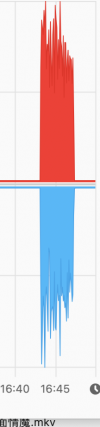
  • copy-speed.png
    copy-speed.png
    96.3 KB · Views: 487
Last edited by a moderator:
When you say "when I copy file", what does that mean (target and destination)? What's the difference to "copy to a Windows share"?

What is your hardware? CPU, disks, SSDs, do you have ZIL or L2ARC? What copies go over the network? What's your network hardware?

Where is the bottleneck? When the slowdown happens, what is using CPU? What is the memory footprint? How busy are the disks?
 
CPU i5-8500 HGST 4TB HDD for share data. It's just very simply home network (1000baseT <full-duplex>).
I just test to copy 3.5TB data to samba share and Windows share. when 2-3GB data copied it will slowdown, but Windows was normal.
I use the whole disk to create one zpool (zpool create data1 /dev/ada0). not use gpart to create freebsd-zfs first. This will effect the performance?
 
I am by no means an expert on the subject, as I'm fairly new to FreeBSD, but if you google zfs and dedup you will most probably see a lot of warnings regarding performance.
 
I just test to copy 3.5TB data to samba share and Windows share.
I still don't understand. When you say "to samba share" and "to windows share", what do you really mean? My suspicion is that you have two SMB servers, one is running FreeBSD with Samba on top of ZFS which you call "Samba share", and a second one is Windows version ??? presumably on NTFS, which you call "Windows share". Is that correct? Note that Unix people typically don't use the word "share", they may call it a server or a file system.

I use the whole disk to create one zpool (zpool create data1 /dev/ada0). not use gpart to create freebsd-zfs first. This will effect the performance?
Should not make a difference for performance. Still a bad practice though.

Again, do you know what the bottleneck is? How busy is the disk, how busy are CPU and RAM? What happens if you turn off dedup and/or compression? Have you tried writing to the file system locally? When you say "copy 3.5TB", do you mean one giant file, or a zillion small files? What type of machine do you copy from? How do you perform the copy (there are many programs that can write the copy)?
 
When you say "copy 3.5TB", do you mean one giant file, or a zillion small files? What type of machine do you copy from? How do you perform the copy (there are many programs that can write the copy)?
^^ this. I got serveral complaints from different customers that their share is so slow - "just copying 3GB of data lasts for half an hour", turned out they copied a huge git repo via sambaserver.
 
What is the layout of the pool?
With dedup there may be a lot of metadata involved, which accounts for lots of random i/o and can completely overwhelm a pool residing on a single spinning rust drive, especially if we're talking about SATA with practically non-existent queueing...

check the output of gstat(8) during transfer. If the drive is 100% busy when your transfer rate drops you have identified your bottleneck.

Advice: disable dedup. Unless you have LOTS of identical data (i.e. dozens of install images with only slightly differing data) you won't need dedup and it will only hurt performance (badly). Dedup takes up (lots!) of RAM which is usually better used for ARC. Disk space is dirt-cheap, especially on spinning rust nowadays, so there's usually no point in using dedup except for *very special* use-cases. Just use more disks if you need more space (and get better iops for the pool as a bonus).
Also 24GB RAM isn't that much, especially not enough to consider using dedup - again: disable it and let ZFS use the RAM for ARC and general housekeeping.

If the disk isn't your bottleneck: what NIC are you using? For best/most stable performance only use intel or maybe mellanox/brocade (or whatever they are called next week) and avoid realtek and other 'budget' NICs at all costs. Many of them tend to "switch to undefined behaviour" under load (or a bit less diplomatic: they suck).
 
I still don't understand. When you say "to samba share" and "to windows share", what do you really mean? My suspicion is that you have two SMB servers, one is running FreeBSD with Samba on top of ZFS which you call "Samba share", and a second one is Windows version ??? presumably on NTFS, which you call "Windows share". Is that correct? Note that Unix people typically don't use the word "share", they may call it a server or a file system.


Should not make a difference for performance. Still a bad practice though.

Again, do you know what the bottleneck is? How busy is the disk, how busy are CPU and RAM? What happens if you turn off dedup and/or compression? Have you tried writing to the file system locally? When you say "copy 3.5TB", do you mean one giant file, or a zillion small files? What type of machine do you copy from? How do you perform the copy (there are many programs that can write the copy)?
two computers, one is freebsd run samba server, another was run windows.
3.5TB not just one single file. All documents together totally was 3.5TB.
CPU sometimes seems 12% smbd used, but not last a long time. RAM was almost 7gib free.
Now I was copied 3.5TB in the disk, if I turn off dedup, are there any other effects to those documents? or will be damaged?
 
Back
Top