x11 app launcher?

I am wondering if anyone has suggestions for an x11 app launcher. I have been trying to find a small program which will allow me to launch a few select apps with icons. cairo-dock is very nice but i do not wish to use it. I have tried tint2 but it's more like a taskbar. If there are Windows users here, then what i am seeking is like a standalone quick launch tray. I have found my new desktop environment: xorg with openbox and a small app launcher. I love this idea of xfce4 App Finder. What a fantastic tool! I also stumbled across ulauncher and i just love this concept. So much so, that i can no longer see a need for a taskbar, context menu or app menu (like start menu on Windows). These app finders are freeking awesome and i think that all desktops should be using them instead of taskbars and menus. I would like to setup my xorg with compton and a small app launcher where i can store a desktop file for xfce App Finder and a few other programs.

Any tips are appreciated...
 
This is usually a window manager function. In kde you can place launchers in the bar at the bottom of the screen. In windowmaker you can dock launchers for specific programs. I expect gnome and xfce has a way to do it.
 
Since you are already using an xfce component
true but FreeBSD dos not have a native gui app finder.I love this concept: type a few letters and click on the program that you want. Beautiful. My idea is to have a blank desktop with an app finder, keyboard switcher, a clock, a calendar, a terminal launcher, a browser launcher and a file manager launcher. And a wallpaper background. In X with openbox wm, since i have xfce4 as a Desktop Environment already.

In x with openbox: I have ibus daemon running with a keyboard switcher but it requires a tray, which sucks. Tint2 is nice but i don't feel like trying to customize it.

Of my list: I have xcalendar and cairo-clock.
I just need a small lightweight app launcher for xfce4 app finder, terminator, firefox and pcfm.

I was hoping to find a small app launcher like wbar. I am having problems with wbar (but i am currently using VirtualBox, so maybe that is why i am having problems with wbar.) Do you know of any other programs like wbar?

Otherwise, i could just use feh for a background and use LXQT panel.
 

Attachments

  • x-openbox-lxqtpanel-feh.jpg
    x-openbox-lxqtpanel-feh.jpg
    30.2 KB · Views: 398
I'm a bit confused as to the ask. On one hand it sounds like you're asking for something like a "panel/dock" the other hand sounds like "windows/gnome3 search bar that returns application suggestions to start".
I guess I'm just old school on how I want my desktop to work. I use WindowMaker (have for a long time), normally used applications wind up in the dock, everything else I start from a CLI in a term window or the "run" item in the menus.
It sounds like you want a desktop that has basically nothing, just something that lets you type in an application name, pops up a list and you select (again Windows Search or Gnome3 search).
Is that what you are trying to get to?
 
I'm a bit confused as to the ask. On one hand it sounds like you're asking for something like a "panel/dock" the other hand sounds like "windows/gnome3 search bar that returns application suggestions to start".
I guess I'm just old school on how I want my desktop to work. I use WindowMaker (have for a long time), normally used applications wind up in the dock, everything else I start from a CLI in a term window or the "run" item in the menus.
It sounds like you want a desktop that has basically nothing, just something that lets you type in an application name, pops up a list and you select (again Windows Search or Gnome3 search).
Is that what you are trying to get to?
yes, i know, i am not being clear in my description. The reason why i cannot quite describe what i desire to have as a "desktop" is because it does not exist. If you imagine a blank desktop (i suppose a wallpaper is okay and probably desireable) but blank as in no taskbar, no dockers just a modified app finder. I made a screen capture of ulauncher to show my ideal desktop. I love this idea but i will have to learn c/cpp to build my own version because ulauncher and xfce4 app finder is lacking components that would complete my ideal desktop.

Imagine the ulauncher with a a small task bar like layer below the search box with a few app launchers (a browser, a terminal, a file manager), virtual desktop switcher, a system clock with a popup calendar, volume control, network manager and a keyboard switcher. Also on top of the ulauncher some options: directories, files, applications, www search options. I am daydreaming until i can learn enough c/cpp to do it myself. In the meantime, i do not yet trust ulauncher. I have to monitor it in wireshark and also system-wide activity. I would rather use xfce4 app finder but it doesn't function like ulauncher (key sequence to open).

I would have to try to build a desktop environment (in x with openbox) by finding a way to have the app launcher with a browser, a terminal, a file manager and app finder). I would have to find a way to add a clock and calendar. I would have to find a way to add a keyboard changer and virtual desktop switcher. It is too complicated, so i guess that i have to use LXQT panel until i can learn enough code to build my own version of ulauncher/xfce4 app finder.

I really see no need to have anything other than these launchers on a desktop. However, the idea of minimizing programs goes to hell without a task tray, so i guess i also have to study how this works to add it to a custom launcher.

I am unable to make this work, so i will stick with lxqt panel and start reading more about c/cpp. I have downloaded some clock source code files to learn how it works. I'll just make this a side project...
 

Attachments

  • ulauncher-desktop.jpg
    ulauncher-desktop.jpg
    9.9 KB · Views: 394
Well kde plasma has krunner which lets you type a couple of letters and then choose from a list of matching commands / tab to autocomplete, that sounds like part of what you want. You could probably customise plasma to do what you want. Plasma 5 is pretty nice, I run it on wayland on a high DPI 4K screen.
 
...seems somebody got the taste of keyboard usage 😁
true but FreeBSD dos not have a native gui app finder.
It's not a FreeBSD but a desktop environment (DE) or window manager (WM) issue.

You either pick a DE that suits your needs best. Or if you don't find one that makes you really happy, 'cause you have pretty clear ideas how you want the things to be, and no DE can be configured to your needs close enough, nor you're not willing to compromise enough to become friends with the concepts any DE brings,...well, pick a WM, and tailor your own - that's what WM are for: starting (very) basic, and you add what you need, how you want it.
Since that's a bit of effort, my recommendation was not to decide too early.
There are several types, such as stacking or tiling WM, some focus less others even more on keyboard usage. Also take a peek if you can become friends with their documentation and their syntax of how things are done.
 
For now, i have settled on xorg with compton, lxpanel and openbox or xfce4 whenever i need a more robust environment.

~/.xinitrc
compton &
lxpanel &
ibus-daemon &
exec openbox-session

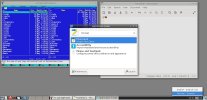
I just added xfce4 Application finder to the lxpanel and now i also have synapse in the panel (thank you jdakhayman )
 

Attachments

  • xorg-openbox-compton-lxpanel.jpg
    xorg-openbox-compton-lxpanel.jpg
    134.8 KB · Views: 396
  • xfce4.jpg
    xfce4.jpg
    63.7 KB · Views: 389
I have a question for experienced and unbiased FreeBSD experts: I am experimenting with xorg to create my own environment. I am running compton, lxpanel and ibus-daemon. I like it. It works but i want to add a wallpaper. I read about feh but i can not get the wallpaper to fill the screen without scaling. My wallpaper is now 2 times my screen width and feh still cannot fill the screen. I am using virtualbox with autoresizing and i am aware that ths is probably why feh cannot display the image correctly (it is not programmed like lxpanel to listen for screen width/height changes and adjust.)

After tinkering with feh and dusting it in disappointment, i discovered that one can run PCManFM as a desktop manager :oops: rather, woohoo! I can have desktop entries and run the --set-wallpaper command. See my screen capture attachment.

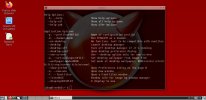
However, the desktop manager has a right-click context menu, which now eclipses the openbox menu. I have to run --desktop-off command to be able to access the right-click openbox menu. So how can i run the PCManFM desktop manager but still be able to acces the openbox menu (which is now a conflict of interest)? so realizing the stupidity, i seek an alternative answer: how can i add a logout of openbox session button to lxpanel along with a trash desktop entry? i do not know how to create a trash entry and i have no idea how to add an openbox session logout entry. Anyone know how to do this? otherwise, the desktop is not my target in xorg because i can simply load a DE. But the wallpaper is really what i seek and feh/hsetroot are failing me at this time.
 

Attachments

  • xorgdesktop.jpg
    xorgdesktop.jpg
    59.7 KB · Views: 285
  • xorgdesktop2.jpg
    xorgdesktop2.jpg
    114.9 KB · Views: 371
I’ve been using bgs for a background on my twm vm environments at work with no problem full screen. I load it in .xinitrc before twm. I can’t recall the exact syntax for a full screen background. I’ll look it up tomorrow when I get get to work and report back.
 
You can use xsetroot to set the root window to a fill color or pattern, and wmsetbg to put an image on the root window. Another way to do it is with graphics/xv, use the 'root' dropdown menu in the gui, and I think xv lets you do it from the commandline too. I really like xv :)
 
I read about feh but i can not get the wallpaper to fill the screen without scaling. My wallpaper is now 2 times my screen width and feh still cannot fill the screen.
Have you emulators/virtualbox-ose-additions installed and vbox related rc.conf services enabled, VBoxClient-all set in ~/.xintirc?

I have a 3987x2000.jpg centered (screen filled) fehbg wallpaper in a 1920x1080 screen VBox VM displayed without problems.
 
I realize now that i have a .config directory, so i have changed the lx logout command to openbox -exit and it works, albeit sans prompt/confirmation. I did not notice the .config directory before now. I have too much to learn about the system.

T-Daemon I did not know about the VBoxClient-all in the xinitrc file. Thank you for the tip. The screen resizing is much smoother now and the system responds better using this method. Much appreciated!

W.hâ/t blackbird9 jardows Thank you all very much for the information. I have to research and experiment with this data. However, i do not have windowmaker so wmsetbg is out. xsetroot apparently only applies bitmaps to the window, which are tiled as a pattern effect.

VBoxClient-all has fixed a few issues with the VM but fehbg disappears after the resize. I will try to track down the issue and try other methods mentioned here.

I will also attach a screen capture of the .config change to the lx panel's logout option. As far as trash can goes, i cannot get pcmanfm to support the trash can. I do not mind because i can manually mv files into Trash directory and use rm.
 

Attachments

  • lxpanel-logout-command.jpg
    lxpanel-logout-command.jpg
    80.8 KB · Views: 116
hruodr Thanks for the tip. I will look at rox-filer today. I am using VirtualBox to learn FreeBSD and to experiment with it. I have alot to learn, especially on the programming side of this system. I have a few books about scripting and i'm trying to convert my php knowledge to C/C++ and on that note, i'm saving source code to alot of these programs that i like.

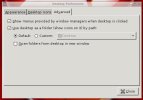
@ everyone: I also noticed an option in the pcmanfm desktop preferences, which is silly of me to not notice it before. Desktop pref has an option to show the window manager's context menu or not. Selecting this option returns the menu and one can log out as usual from openbox. However, i prefer to use the lx panel modification to the Logout command.

Also, i have tried commenting everything out from my xinitrc file and feh still disappears after VirtualBox resizes the desktop. I do not know why but i am comfortable using pcmanfm in this case. Although, i do like plain old twm. The reason that i am experimenting with xorg and a sort of desktop environment is because i am not sure that i even want to install a DE in FreeBSD. I may end up going with xorg, compton, pcmanfm desktop and a panel on my laptop. I like it for some reason. I suppose because i have alot of functionality but none of the typical bloat of a full DE. I only enter xorg whenever i need to do things that i cannot do in the login shell (gui related topics, such as graphical browsers, emulators etc).

I am growing quite fond of sh and command driven computing lately.
 

Attachments

  • pcmanfm-desktop-preferences.jpg
    pcmanfm-desktop-preferences.jpg
    30.6 KB · Views: 350
My idea is to have a blank desktop with an app finder, keyboard switcher, a clock, a calendar, a terminal launcher, a browser launcher and a file manager launcher. And a wallpaper background. In X with openbox wm, since i have xfce4 as a Desktop Environment already.

I have (almost) all that with the old twm windows manager.

The Desktop environments are really for apes that do everything with the mouse, also the configuration.

twm is very powerful, but one must configure it. It is easy to configure, but impossible without writing a configuration file and reading the man page before.

My .twmrc configuration is the product of years of continuous and never ending adaption to my needs.

The reason why i cannot quite describe what i desire to have as a "desktop" is because it does not exist.

You need some apps like a file and application manager.

For example twm has no virtual desktops, enhancement including it are not so good or stable. A solution could be x11/vdesk , but it needs to be improved: after changing desktops the focus of the widgets changes.

rox-filer is the most lightweight and simple file (and application) manager I found, it is also part of the nice "ROX Desktop", but again, it could be improved, simplified, made more lightweight, more like the standard X11 apps.

X11 is old, and it is still a lot to do. It would have been nice that apps like vdesk or roxx were part of X11 as xterm or xclock. At the moment there is not even a CLI mail client for today's requirements.

One have, what is there, one can work, with what is there, so that even if one is not 100% happy, one does not waste energy to write new programs.

Perhaps with tcl/tk you can easily write a file and application manager that fit your taste.
 
I have a few books about scripting and i'm trying to convert my php knowledge to C/C++ and on that note, i'm saving source code to alot of these programs that i like.
By the way, try tcl/tk. You will like it. And easy to learn if you have experience with scripting (php).

I use it a lot, specially combined with sqlite3.

Learning C / C++ is sure good, but writing widgets is not easy (except with tk).

I think you can write a nice file and application manager with tcl/tk, you will perhaps need the extension for drag and drop.
 
By the way, try tcl/tk. You will like it. And easy to learn if you have experience with scripting (php).

I use it a lot, specially combined with sqlite3.

Learning C / C++ is sure good, but writing widgets is not easy (except with tk).

I think you can write a nice file and application manager with tcl/tk, you will perhaps need the extension for drag and drop.
I will look at tcl/tk later today. I have already started using system calls and shell commands in both php and c and cpp. I will show you screen captures later. I'm reading in between playing with FreeBSD. I have to learn how to make system software. The reason that i prefer c/cpp: one can include all of the necessary files (#include like php include or require) and compile to a single application instead of 500 dependencies scattered all over the system. I would like to program my own panel, file manager and application finder. I am downloading desktop manager source code to see how that is working as well. I think that a FreeBSD environment is better than using Linux software in FreeBSD. I have alot to learn but i am tinkering with it often and learning as much as i can. I will download some material about tcl/tk. I have heard about it before but i know very little about it. I have to log off now but i will return later today...

I hope that you have a nice day :)
 
The reason that i prefer c/cpp: one can include all of the necessary files
You can program in C / C++ for extending tcl/tk to what you want to have.
That gives flexibility to your program: it can then be scripted.

Tk is an old widget set, originally for Tcl from the tcl people, but now ported to other languages.

I am sure you can do it with tcl/tk. In C / C++ it will take a lot of time if you are just now learning the language.

Simple X11 app launcher: x11/rofi, x11/dmenu.

Yes, he should use the 'bricks' that are there, like dmenu
.

In my .twmrc I have, for calling programs with keys or menu items, things like:
"c" = m4 : all : f.exec "calendar -A 14 | xmessage -file - &"
or
"Tmux" f.exec "exec xterm -e '/usr/local/bin/tmux new -As0'&"
or
"gm import snap.jpg" f.exec "gm import snap-$(date +%s).jpg &"

Note the use of xmessage or xterm -e.

He could perhaps embed some own scripts there and reach what he wants without much programming.
 
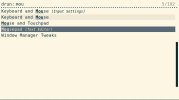
Minbari I have rofi and dmenu already. I forgot about both 😳 very nice, indeed. Thank you for reminding me. Rofi seems to answer my earlier question too (accessing minimized running programs without a taskbar).

hruodr Thank you for the sample configuration code. I'll play with my own tweaks and do some research on the subject. I appreciate the tips. Also, you may be underestimating my knowledge of php. And, from c/cpp source code that i have viewed, php is so similar that i understand exactly what is happening minus system specific code that i have yet to learn. My first c/cpp programs are a system call in addition to the standard hellow world but it is merely a test. I intend to bury myself in educational material and use my knowledge of both c/cpp from the php side of the tracks. I feel very comfortable with c/cpp because of php. I will also look at tcl/tk, as per your suggestion. Python, on the other hand, is simply too far away from the c/cpp/php/java side of the tracks. I do not like Python. I sometimes downright despise it.

my daily work is php, sql (with mysql or mariadb), html5, css1-3, javascript, svg, graphics. I once learned QBasic, ASP and VBScript but i got away from it. I have been a Windows user since 1999 and adding MS specific programming is too far into the "Microsoft Way" for my liking. Meantime, FreeBSD and Linux have been on my radar since January. I'm going to install FreeBSD on my laptop soon and never look back...

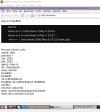
I've added a screen capture attachment of the output from my php system calls test script as well.
 

Attachments

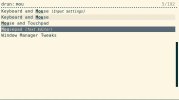
  • rofi-drun.jpg
    rofi-drun.jpg
    22.9 KB · Views: 369
  • php.jpg
    php.jpg
    62.1 KB · Views: 245
  • rofi-drun.jpg
    rofi-drun.jpg
    22.9 KB · Views: 374
Back
Top