
Wireless-to-wired client

Hi,

First time FreeBSD forum user here. As per attached drawing, I am trying to create a wireless link between a pfSense box located on the second floor and a wired network down in the basement. The LAN 'computer' downstairs is a network printer, maybe a Wii console (debating) and/or Blu-ray player. Currently the job of the bridge is performed by a Windows 8 laptop with a temporary OS license set to expire in a couple of months. I would prefer to switch the OS to *BSD.

What I've done so far: gotten FreeBSD 10 up and running and the iwi0 interface associated with an AP.

Snippet from loader.conf:
Code:
if_iwi_load="YES"
legal.intel_iwi.license_ack=1
Snippet from /etc/rc.conf:
Code:
wlans_iwi0="wlan0"
ifconfig_wlan0="WPA SYNCDHCP"
if_bridge_load="YES"
bridgestp_load="YES"
cloned_interfaces="bridge0"
ifconfig_bridge0="addm bge0 addm wlan0 up"
ifconfig_bge0="up"
ifconfig_wlan0="up"
Snippet from /etc/wpa_supplicant.conf:
Code:
network={
ssid="myssid"
psk="passkey"
}
From what I understand, I need to create some ipfw rules in order to pass the traffic through the bridge. I need to do some reading.

I scoured the Internet for a guide, but came up empty-handed. Any howto's that you guys recommend?
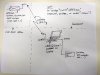
 

Attachments

  • IMG_20141103_163655812_s.jpg
    IMG_20141103_163655812_s.jpg
    978.5 KB · Views: 357
There's no need for IPFW unless you want to firewall things. But I don't recommend that, it's a bridge and it should pass all traffic. From the looks of it you already have a working setup and no other configuration would be necessary.
 
SirDice, thank you for the quick reply. Here are the contents of /etc/rc.conf:
Code:
hostname="FreeBSD"
sshd_enable="YES"
# Set dumpdev to "AUTO" to enable crash dumps, "NO" to disable
dumpdev="AUTO"

powerd_enable="YES"
powerd_flags="-a adaptive"

wlans_iwi0="wlan0"
ifconfig_wlan0="WPA SYNCDHCP"
if_bridge_load="YES"
bridgestp_load="YES"
cloned_interfaces="bridge0"
ifconfig_bridge0="addm bge0 addm wlan0 up"
ifconfig_bge0="up"
#ifconfig_wlan0="up"

Next, I connected a test host (Debian, IP address 192.168.1.202) to the bge interface and I am able to ping it from the laptop 'bridge'. But when I try to ping the Debian box from a computer that is connected to pfSense's switch, I get
Code:
Destination Host Unreachable

ifconfig of the 'bridge' laptop:
Code:
bge0: flags=8943<UP,BROADCAST,RUNNING,PROMISC,SIMPLEX,MULTICAST> metric 0 mtu 1500
   options=80099<RXCSUM,VLAN_MTU,VLAN_HWTAGGING,VLAN_HWCSUM,LINKSTATE>
   ether 00:14:22:...........
   inet6 fe80::214:22ff:fef5:fe0f%bge0 prefixlen 64 scopeid 0x1
   nd6 options=29<PERFORMNUD,IFDISABLED,AUTO_LINKLOCAL>
   media: Ethernet autoselect (100baseTX <full-duplex>)
   status: active
iwi0: flags=8843<UP,BROADCAST,RUNNING,SIMPLEX,MULTICAST> metric 0 mtu 2290
   ether 00:16:6f:........
   nd6 options=21<PERFORMNUD,AUTO_LINKLOCAL>
   media: IEEE 802.11 Wireless Ethernet autoselect mode 11g
   status: associated
lo0: flags=8049<UP,LOOPBACK,RUNNING,MULTICAST> metric 0 mtu 16384
   options=600003<RXCSUM,TXCSUM,RXCSUM_IPV6,TXCSUM_IPV6>
   inet6 ::1 prefixlen 128
   inet6 fe80::1%lo0 prefixlen 64 scopeid 0x3
   inet 127.0.0.1 netmask 0xff000000
   nd6 options=21<PERFORMNUD,AUTO_LINKLOCAL>
bridge0: flags=8843<UP,BROADCAST,RUNNING,SIMPLEX,MULTICAST> metric 0 mtu 1500
   ether 02:79:1c:e8:a3:00
   nd6 options=9<PERFORMNUD,IFDISABLED>
   id 00:00:00:00:00:00 priority 32768 hellotime 2 fwddelay 15
   maxage 20 holdcnt 6 proto rstp maxaddr 2000 timeout 1200
   root id 00:00:00:00:00:00 priority 32768 ifcost 0 port 0
   member: wlan0 flags=143<LEARNING,DISCOVER,AUTOEDGE,AUTOPTP>
    ifmaxaddr 0 port 5 priority 128 path cost 370370
   member: bge0 flags=143<LEARNING,DISCOVER,AUTOEDGE,AUTOPTP>
    ifmaxaddr 0 port 1 priority 128 path cost 200000
wlan0: flags=8943<UP,BROADCAST,RUNNING,PROMISC,SIMPLEX,MULTICAST> metric 0 mtu 1500
   ether 00:16:6f:...........
   inet 192.168.1.192 netmask 0xffffff00 broadcast 192.168.1.255
   nd6 options=29<PERFORMNUD,IFDISABLED,AUTO_LINKLOCAL>
   media: IEEE 802.11 Wireless Ethernet OFDM/24Mbps mode 11g
   status: associated
   ssid whatever channel 11 (2462 MHz 11g) bssid 00:0e:2e:........
   country US authmode WPA privacy ON deftxkey UNDEF TKIP 2:128-bit
   txpower 0 bmiss 24 scanvalid 60 protmode CTS wme roaming MANUAL
So perhaps there is something I missed?

Thanks in advance.
 
Code:
if_bridge_load="YES"
bridgestp_load="YES"
These are supposed to go in /boot/loader.conf. They're easy to distinguish, variables for rc.conf end with _enable whereas variables for loader.conf end with _load.

Next, I connected a test host (Debian, IP address 192.168.1.202) to the bge interface and I am able to ping it from the laptop 'bridge'. But when I try to ping the Debian box from a computer that is connected to pfSense's switch, I get "Destination Host Unreachable".
You probably need to add this to rc.conf:
Code:
gateway_enable="YES"
 
thank you, SirDice

Still no cigar :(

Moved the
Code:
if_bridge_load="YES"
bridgestp_load="YES"
to loader.conf and added
Code:
gateway_enable="YES"
to rc.conf, but unfortunately it did not seem to help - still unable to ping the host connected to the wired Ethernet port.

Not sure if this helps, but when I run tcpdump -i bridge0 on the laptop and invoke arp-scan on the LAN host (one that's connected directly to the pfSense's switch), I see this (snippet):
Code:
21:23:54.056609 ARP, Request who-has 192.168.1.200 tell 192.168.1.149, length 46
21:23:54.057709 ARP, Request who-has 192.168.1.201 tell 192.168.1.149, length 46
21:23:54.058846 ARP, Request who-has 192.168.1.202 tell 192.168.1.149, length 46
21:23:54.059095 ARP, Reply 192.168.1.202 is-at 00:90:27:.......... (oui Unknown), length 46
21:23:54.059883 ARP, Request who-has 192.168.1.203 tell 192.168.1.149, length 46
21:23:54.061972 ARP, Request who-has 192.168.1.204 tell 192.168.1.149, length 46
21:23:54.063141 ARP, Request who-has 192.168.1.205 tell 192.168.1.149, length 46
21:23:54.064265 ARP, Request who-has 192.168.1.206 tell 192.168.1.149, length 46

Any other suggestions?
TIA
 
Is this required in /etc/sysctl.conf:

Code:
net.link.ether.ipfw=1

and in /etc/rc.conf:

Code:
firewall_type="open"

for ALL traffic to pass through the bridge interface unrestricted?
 
Gentle bump.

Found this quote on the Debian wiki:
https://wiki.debian.org/BridgeNetworkConnections#Bridging_with_a_wireless_NIC
Bridging with a wireless NIC
Just like you can bridge two wired ethernet interfaces, you can bridge between an ethernet interface and a wireless interface. However, most Access Points (APs) will reject frames that have a source address that didn’t authenticate with the AP. Since Linux does ethernet bridging transparently (doesn’t modify outgoing or incoming frames), we have to set up some rules to do this with a program called ebtables.

Is it possible to implement some mechanism similar to Debian's ebtables on the FreeBSD platform in order to trick the AP into accepting the traffic? BTW, in Linux, an attempt to add a wireless interface to the bridge is met with "Operation not supported" message.
As of now, in FreeBSD, the wireless-to-wired (wlan0-to-em0) bridge does not work, but wired-to-wired one (ue0-to-em0) does.

Thanks.
 
Back
Top