Solved Which filesystem should I use for a USB flash drive to ensure it is accessible on both FreeBSD and Linux?

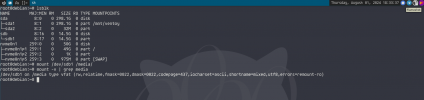
Hello, the sole purpose of this USB flash drive is to store my GPG key, which I have generated and is located in the .gnupg folder within my home directory. I want to compress the entire folder into a .tar.gz file and then upload it to the USB drive. As you know, it’s not a good idea to store such keys on Dropbox or anywhere online. The USB drive might not be the most secure option either, but it works for me. The goal is to make sure I can access it on both FreeBSD and Linux. If I were to format the USB drive on FreeBSD, is it a complicated process?
 
If I were to format the USB drive on FreeBSD, is it a complicated process?
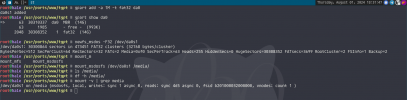
No, it is easy actually.

I think fat32 would be accessible in both OS. I could mount it in both FreeBSD and Debian. If you wouldn't copy things over 4GB to this drive, fat32 would be OK. If you would copy files over 4GB, you can use exFAT, it doesn't have these limits. exFAT on FreeBSD requires fusefs, you can use sysutils/fusefs-exfat and mount using # mount.exfat-fuse /dev/da0s1 /media.

Code:
# # assuming usb drive to be formatted is da0
# gpart destroy -F da0
# gpart create -s mbr da0
# gpart add -a 1M -t fat32 da0
# newfs_msdos -F32 /dev/da0s1
# mount_msdosfs /dev/da0s1 /media
 

Attachments

  • 1722526322105.png
    1722526322105.png
    131.8 KB · Views: 274
  • 1722526424440.png
    1722526424440.png
    95.4 KB · Views: 259
Thank you. I appreciate it. I will use FAT32 because the flash drive is exactly 4GB. As far as I know, FAT32 doesn’t retain file permissions, but I don’t think that matters since it’s a tar.gz file, right?
 
For larger things ZFS can be used between Linux and FreeBSD, if you make sure you turn off features the other OS can't deal with when making the pool.

However, the ZFS mounting process is not the most practical for removable drives.
 
Back
Top