Solved Unable to boot in FreeBSD 10

Hi,

I run FreeBSD 10.1 under VirtualBox and actually I can't boot, a prompt message appears:
Code:
mountroot >

So I really ignore what to type and how to fix this problem.

Thanks for help.
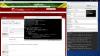
 
This a screenshot of my FreeBSD under VirtualBox
 

Attachments

  • Capture d'écran de 2015-05-30.png
    Capture d'écran de 2015-05-30.png
    580.4 KB · Views: 468
Type in ? and post a screenshot again. Does the message appear after an install? Or are you trying to boot the installer?

VirtualBox has a screenshot function (it's in the Machine menu), so you don't have to post your whole desktop.
 
Was this after the original install or did you do things late and then have the problem? Also, at the end of the install, when it asks if you want to make changes before rebooting, did you make any?
(I've found that sometimes, especially if I edit /boot/loader.conf, with say, a shorter autoboot_delay, I wind up getting that message. It's been random, so I assume I mistyped something.)

At any rate, you can try, at that prompt, typing

Code:
ufs:/dev/ada0p1

and see if it boots. (If you look at the message, it's giving you examples of what you might type to get it working.)
 
How did you install FreeBSD? The hang while waiting on usbus0 is peculiar as installing from an ISO will not result in seeing that.
 
I encounter this problem without doing special things after original install. I just modify USB configuration in VirtualBox.

I try :
ufs:/dev/ada0p2
but the system don't boot.
 
Can you be more specific by what steps you follow for "I just modify USB configuration in VirtualBox"? I generally just installed with one VDI disk for the system drive. I've installed using whatever ISO version I am testing and generally accept all the installer defaults. It just works doing that.
 
Back
Top