
Solved two issues after upgrading to version 15

So I saw the announcement that 15.0 was released and I read 15.0 Release notes I followed the part for upgrading from a previous version./
Now if try running pkg anything I get this error:
ld-elf.so.1: Shared object "libutil.so.9" not found, required by "pkg"

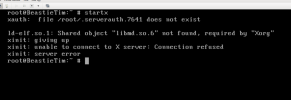
The other problem is my desktop (XFCE) doesn't appear and the lightdm greeter doesn't appear.
If I try to run startx it fails with this error in the screenshot attached.
So How would I fix these issues or where is the ISO for 15.0 ?
Thanks in advance.
 

Attachments

  • FreeBSD-error.png
    FreeBSD-error.png
    101.5 KB · Views: 107
Now if try running pkg anything I get this error:
ld-elf.so.1: Shared object "libutil.so.9" not found, required by "pkg"
You forgot to upgrade the packages? Or are you stuck on that stage?
At this point, users of systems being upgraded from earlier FreeBSD releases will be prompted by freebsd-update(8) to rebuild or reinstall all third-party applications (e.g., ports installed from the ports tree or packages installed by pkg(8)) due to updates in system libraries.
pkg bootstrap -f
That should fix pkg(8), then you can follow-up with a pkg upgrade
 
Sorry I didn't see the reply until now. I'm stuck on that stage. I'm unable to run any pkg commands with out that error. It's an VM Image so I'll just reinstall 15.0 and then remove the previous image. But thanks for the quick reply. This can be marked as solved btw.
 
I have the exact same problem after following the RELEASE 15 upgrade instruction here : https://www.freebsd.org/releases/15.0R/installation/#upgrade

Here the log :

Code:
xxx@xxx:~ $ sudo freebsd-update install
Password:
src component not installed, skipped
Creating snapshot of existing boot environment... done.
Installing updates...
Restarting sshd after upgrade
Performing sanity check on sshd configuration.
Stopping sshd.
Waiting for PIDS: 54835.
Performing sanity check on sshd configuration.
Starting sshd.

Completing this upgrade requires removing old shared object files.
Please rebuild all installed 3rd party software (e.g., programs
installed from the ports tree) and then run
'freebsd-update [options] install' again to finish installing updates.

xxx@xxx:~ $ sudo freebsd-update install
Password:
pkg: Warning: Major OS version upgrade detected.  Running "pkg bootstrap -f" recommended
src component not installed, skipped
Creating snapshot of existing boot environment... done.
Installing updates... done.
reyman@Nostromo:~ $ sudo pkg bootstrap -f
ld-elf.so.1: Shared object "libutil.so.9" not found, required by "sudo"

xxx@xxx:~ $

xxx@xxx:~ $ pkg bootstrap -f
The package management tool is not yet installed on your system.
Do you want to fetch and install it now? [y/N]: y
Bootstrapping pkg from pkg+https://pkg.freebsd.org/FreeBSD:15:amd64/quarterly, please wait...
Verifying signature with trusted certificate pkg.freebsd.org.2013102301... done
pkg: failed to extract pkg-static: Can't unlink already-existing object
Bootstrapping pkg from pkg+https://pkg.freebsd.org/FreeBSD:15:amd64/kmods_quarterly_0, please wait...
pkg: Error fetching https://pkg.freebsd.org/FreeBSD:15:amd64/kmods_quarterly_0/Latest/pkg.pkg: Not Found
A pre-built version of pkg could not be found for your system.

I have this into my FreeBSD.conf and i cannot modifying anything because sudo don't works now.

Code:
xxx@xxx:~ $ cat /etc/pkg/FreeBSD.conf
#
# To disable a repository, instead of modifying or removing this file,
# create a /usr/local/etc/pkg/repos/FreeBSD.conf file, e.g.:
#
#   mkdir -p /usr/local/etc/pkg/repos
#   echo "FreeBSD-ports: { enabled: no }" > /usr/local/etc/pkg/repos/FreeBSD.conf
#   echo "FreeBSD-ports-kmods: { enabled: no }" >> /usr/local/etc/pkg/repos/FreeBSD.conf
#
# Note that the FreeBSD-base repository is disabled by default.
#

FreeBSD-ports: {
  url: "pkg+https://pkg.FreeBSD.org/${ABI}/quarterly",
  mirror_type: "srv",
  signature_type: "fingerprints",
  fingerprints: "/usr/share/keys/pkg",
  enabled: yes
}
FreeBSD-ports-kmods: {
  url: "pkg+https://pkg.FreeBSD.org/${ABI}/kmods_quarterly_${VERSION_MINOR}",
  mirror_type: "srv",
  signature_type: "fingerprints",
  fingerprints: "/usr/share/keys/pkg",
  enabled: yes
}
FreeBSD-base: {
  url: "pkg+https://pkg.FreeBSD.org/${ABI}/base_release_${VERSION_MINOR}",
  mirror_type: "srv",
  signature_type: "fingerprints",
  fingerprints: "/usr/share/keys/pkgbase-${VERSION_MAJOR}",
  enabled: no
}

I'm stuck here, is there a way without reinstalling all

Edit 1 :


Code:
root@xxxx:home/xxx # echo "FreeBSD-ports-kmods: { enabled: no }" | tee -a /usr/local/etc/pkg/repos/FreeBSD.conf
FreeBSD-ports-kmods: { enabled: no }
root@xxx:/home/xxx # echo "FreeBSD-ports: { enabled: yes }" | tee /usr/local/etc/pkg/repos/FreeBSD.conf
FreeBSD-ports: { enabled: yes }

root@xxx:/home/xxx # pkg bootstrap -f
The package management tool is not yet installed on your system.
Do you want to fetch and install it now? [y/N]: y
Bootstrapping pkg from pkg+https://pkg.FreeBSD.org/FreeBSD:15:amd64/quarterly, please wait...
Verifying signature with trusted certificate pkg.freebsd.org.2013102301... done
Installing pkg-2.4.2...
package pkg is already installed, forced install
Extracting pkg-2.4.2: 100%

pkg install sudo
... leaving root ...
pkg upgrade

It seems linked to kmods.

Actually that works now, but i don't know what happens during the process, any explanation is welcome :)
 
yep, same issue. pkg requires libutil and doas requires libutil. No ports on my system (it is a little server). I just logged in as root on the machine, made a directory with:
libutil.so.9 linked to libutil.so.10
libssl.so.30 linked to libssl.so.35
libssl.so linked to libssl.so.35

Set the LD_LIBRARY_PATH to the folder and ran pkg bootstrap -f. Than a pkg update and pkg upgrade. doas works again, pkg works again.

Had the idea I just saw a lot of reinstalling, sorry didn't look that close.
 
Erichans nice stuff. Didn't know about the pkg-static version.

So as a proper fix, login as root and run pkg-static bootstrap -r. (I haven't test this)

Still thing this is a bug though. It does look like it ran through the steps it wanted: After reboot ran freebsd-update install again and than it said something like, link your excisting non-pkg stuff against new libs and run freebsd-update install again. So not stuck on some stage.

On my second FreeBSD machine I installed misc/compat14x before running freebsd-update, worked fine.
 
[...] Still thing this is a bug though. [...]
My guess is that, during a full upgrade process, too many freebsd-update install-s have been run and/or not at the appropriate time with respect to upgrading all packages of the ports tree* (as opposed to base packages, if one runs a packaged base 15.0-RELEASE).

On my second FreeBSD machine I installed misc/compat14x before running freebsd-update, worked fine.
That seems the most appropriate thing to do before starting the upgrade process, as a safety precaution.

Afterwards, you'll have to make do with, for example, with pkg-fetch(8) and moving that .pkg file around to the targeted system when for instance networking access has also been affected. However, it looks to me, when having been shut out remotely and unable to gain root level access/elevated rights (sudo/doas), you're in a tough spot, but I don't know all the tricks ;)

___
* I don't have the whole (and clear) picture of that fully in my mind; note-to-self: must look up the wise references of SirDice.
 
yep, same issue. pkg requires libutil and doas requires libutil. [...]

libutil.so.9 linked to libutil.so.10
libssl.so.30 linked to libssl.so.35
libssl.so linked to libssl.so.35

I had ports-mgmt/pkg-provides installed--it needs a minor set up.
Rich (BB code):
[1-0] # pkg query -e '%n~pkg-provides' '[%R] %o %n %v' | column -t
[FreeBSD]  ports-mgmt/pkg-provides  pkg-provides  0.7.4
[2-0] # pkg provides libssl.so.30
Name    : compat14x-amd64-14.2.1402000.20251120
Comment : Convenience package to install the compat14x libraries
Repo    : FreeBSD
Filename: usr/local/lib32/compat/libssl.so.30
          usr/local/lib/compat/libssl.so.30
[3-0] #
 
Reboot, so the 'new' kernel and userland are active. Then do the pkg bootstrap -f and pkg upgrade.
I had the same issue after upgrading from source. pkg bootstrap -f did not help. What helped was rebuilding and reinstalling pkg from a port. It is working now on my VM.
 
Reboot, so the 'new' kernel and userland are active. Then do the pkg bootstrap -f and pkg upgrade.

I followed the instructions on this page: https://www.freebsd.org/releases/15.0R/installation/#upgrade

I had quite a time with this upgrade. I have a couple FreeBSD machines running at work. One is a standalone server and another virtual server. The virtual is my main server and is a replacement for the bare metal (BM) box. I started the upgrade process with the BM server and I'm very glad i did. My first attempt at upgrading from 14.3 to 15.0 borked and was unrecoverable. I had to go into work and into my datacenter to login at the console! I plugged my v14.0 USB stick into the server and reinstalled. Tried the upgrade and it borked again.

The first two attempts I believe cratered because I was running the ksh93 shell. I couldn't login and got ksh errors each time. 3'd attempt, I left the default shel (/bin/sh) and again it borked. I'm not sure what I did, or didn't do, but that one was also unrecoverable. I got to thinking about it last night and realized I went from 14.0 to 15.0 and wondered if that wasn't the issue. So just now I connected to the server remotely (thank goodness for remote KVM's........lol), I did a clean install of 14.0. Then I upgraded to 14.3 and finally, up to 15.0

After the last reboot (according to the guide I posted the link to above) I logged in and tried to upgrade the pkg. It wouldn't. I did some research and saw this post so I followed your advice and ran pkg bootstrap -f and pkg upgrade. That seemed to do the trick so thanks for the advice!

root@CS4:~ # uname -a
FreeBSD CS4.5 15.0-RELEASE FreeBSD 15.0-RELEASE releng/15.0-n280995-7aedc8de6446 GENERIC amd64
root@CS4:~ #


I just now changed the shell on my production server to /bin/sh and am going to proceed to do the upgrade...after I .tar the whole thing up and copy it to the BM server!
 
Back
Top