Mini PC or Lenovo Notebook Who is Better to Test on it FreeBSD 15?

Mini PC or Lenovo Notebook Who is Better to Test on it FreeBSD 15? Who is better for you?

  • MINI PC

    Votes: 2 66.7%
  • LENOVO NOTEBOOK

    Votes: 1 33.3%

  • Total voters
    3
Who is better for you? My use will be primarly just for job(libre office) or enterteinment(Media center, audio-video streaming), and some test with bhyve,jails,QEmu.... ;)

NOTEBOOK LENOVO
Pro:LENOVO "build" cheaps and performated hardwares, and I can buy without Microsoft Windows stuffs and buy instead better Hardwares , Microsoft stuff costs is about 232 $ (200 Euro)... Total 650 Euro (812 dollars)

Negative:it's a notebook....:-/

MINI PC
Pro:
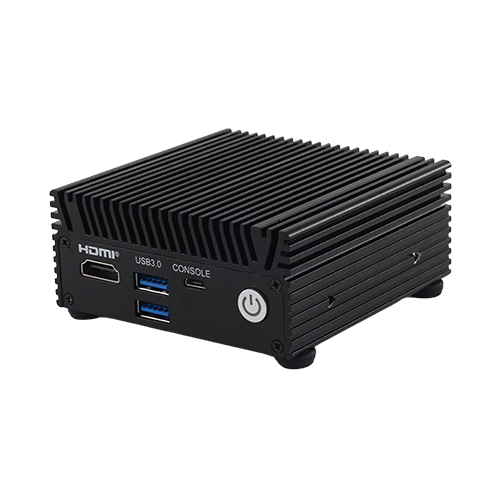
It's compacted, good hardware configuration, i9, 16 or 32 Gb ram, 250, or 500 Gb SSD,USB 3.1, HDMI,Graphic card ATI Radeon or Integrated Intel,good enough..mobile chipset, prize 320 (370 to 529 dollars) to 456 euro.

Negative: It's with Windows 11, and take 3 weeks to receive by local deliverman, because it will come from China market , a famous E-Commerce Shop, and I dont know if with it could be some hardwares' issues with FreeBSD.

TO YOU ROUGHTLY HARD DECISION😅
 
Not enough details on the two computers to say.

Generally, laptops suck. If you want to compile big things an i9 in a desktop will spank a cheap laptop.
 
I'd go with the Mini PC for a calm set-up (I'd be wiping and trying multiple OSs for a while from the Lenovo if it had better more interesting hardware like a dGPU :p)

The Mini PC coming from China might have an interesting BIOS or be less locked-down too
 
Of the two, I would go for the mini-pc, and choose intel integrated graphics and an intel NIC in the box. A modern ultrabook-type laptop probably won't have an RJ45 ethernet socket, so you're stuck with wifi. Getting wifi working is always a bit hit or miss depending upon which chipset you have, whereas wired ethernet with an RJ45 and an intel NIC always works in my experience. Be a bit more careful with things like realtek NIC's, they are usually OK, but sometimes there can be problems. Similarly intel chipset graphics almost always works, whereas ymmv with ati or nvidia, or you may have to spend more time getting it to work. That's not to say that AMD chipsets or nvidia graphics won't work, but you may have to spend more time tweaking drivers etc.

So I would go for a mini pc, wired ethernet with RJ45 socket, and intel integrated graphics. That should at least get a system up and running with a graphical desktop and a network connection, even if not every other peripheral in the machine is supported.

There is a third (likely cheaper) option, which is to get an older lenovo laptop, like a T480, or X200-series, which does have RJ45 ethernet and are pretty well supported, but then you have an older CPU and less memory, lower screen resolution. So it depends on what you want it for.
 
TBH, personally, I'd use a VM unless you're at the stage where you need to test on hardware. There's also the option of just running off of an external USB drive for a test run.

But, if you're looking to buy hardware, the mini PC is far less likely to have any headaches. Laptops have always been hit or miss in terms of the necessary drivers, and even if it does work, it's going to require more work. In general GPU and sound drivers tend to be the things that are most important to look at in terms of compatibility just because they tend to be rather important and aren't easily replaced.
 
I'd go for the mini PC. Nice specs but how is it doing at full load?
Another tip on the mini-pc is to upgrade your heatsink paste, if they used paste when they assembled it (some of them use thermal pads now instead of paste, in which case probably best to leave it alone). Upgrading the paste tends to lower CPU temps under load and improve stability. The little coolers they put in mini-pc's need every bit of help they can get, and the factory paste they use is usually the cheapest junk around.
View: https://www.youtube.com/shorts/4XHYBg41Xqs
 
I've had the opportunity to use some of these for $WORK

Neat little package, ethernet is Realtek not included by default of most images so you have chicken/egg situation (not sure if latest 15.x or 16.x have it). So you can install but after that you need to use a different system to get the package and install it.

Typical a bit of lead time, more expensive than I want but honestly a nice package smaller than a softball.

Thinking about "home network stuff" I think I would start with something like this (NUC) and then do a NAS or something for storage of data.
 
Personally I would recommend getting a Lenovo Thinkstation

1772998298923.png
 
The choice between a mini PC and a laptop depends on how important mobility is to you and whether you already have a ready-made workstation with a monitor and keyboard.
On a ThinkPad T480 or ThinkPad X1 Carbon Gen 6, FreeBSD will run great!

 
I'd go for the mini PC. Nice specs but how is it doing at full load?
really, I don't know, I could probably add both links, I appreciated a lot your helps and advices, i'm not a developer, just a modern tech geek,in another space-time dimension.one would have said nerd,lol,but i'm a neophyte and passionate about our operating system, and so up until now I have experimented on VMs, and for the last six months on an old HP pavillion laptop, from 2009. So I would like to start testing the new system version 15, for now, with modern hardware, but I do not know the limits of the drivers available for the OS, I just heard that ones too modern is not covered by developers' team....
 
More things that can go wrong are integrated in a laptop, underpowered cpu, lucky if you get an ethernet port, less extensibility etc. I'd go for a mini pc.
 
I've used a laptop for server for years :cool: (swapped from a Phenom II desktop for power-saving); kind-of convenient having screen, keyboard, and mouse all in one!
Who is better for you? My use will be primarly just for job(libre office) or enterteinment(Media center, audio-video streaming), and some test with bhyve,jails,QEmu.... ;)
If it's one machine to do all of that I'd get the best-spec'd one
 
Back
Top