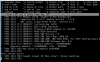
Hyper-V Xorg Bus error

I've created several VMs under Hyper-V (Windows 8.1/Server 2012 R2) and since somewhere last week I can't get X to work anymore. With X I mean startx.

Before that, not problem while using the handbook (which I just found out is outdated since hald and dbus aren't needed anymore).

What I have done is pkg install xorg-server and then run startx.

That crashes with:
Code:
Bus error at address 0x4a40f0
Fatal server error: Caught signal 10 (Bus error). Server aborting.
One other thing I see is right after starting startx:
Code:
xauth: file /root/.serverauth.844 does not exist
Yes, I am running as root for now, but as a normal user (in the wheel group) it's the same thing.

I've tried installed x11-drivers/xf86-video-fbdev, but that only gave me extra error. Can't add or remove screens, etc. But it's also something I never installed before, and therefore I feel I should not need it now as well.

I hope anyone has an idea. I'm very new to FreeBSD, but I had this running in several VM's until it suddenly didn't work anymore. Even had XFCE and Lumina working.
Sludge_Xorg.PNG
 
Same problem here after some of the last updates, before all worked like a charm. This is also a Hyper-V machine.

X -configure
Code:
$ sudo X -configure

X.Org X Server 1.14.7
Release Date: 2014-06-05
X Protocol Version 11, Revision 0
Build Operating System: FreeBSD 10.1-RELEASE-p9 amd64
Current Operating System: FreeBSD bsdvm 10.1-RELEASE-p9 FreeBSD 10.1-RELEASE-p9 #0: Tue Apr  7 01:09:46 UTC 2015  root@amd64-builder.daemonology.net:/usr/obj/usr/src/sys/GENERIC amd64
Build Date: 20 April 2015  04:18:37PM
Current version of pixman: 0.32.6
   Before reporting problems, check http://wiki.x.org
   to make sure that you have the latest version.
Markers: (--) probed, (**) from config file, (==) default setting,
   (++) from command line, (!!) notice, (II) informational,
   (WW) warning, (EE) error, (NI) not implemented, (??) unknown.
(==) Log file: "/var/log/Xorg.0.log", Time: Tue Apr 28 10:13:30 2015
List of video drivers:
   radeon
   r128
   openchrome
   nv
   mach64
   intel
   ati
   vesa
(++) Using config file: "/root/xorg.conf.new"


Xorg detected your mouse at device /dev/sysmouse.
Please check your config if the mouse is still not
operational, as by default Xorg tries to autodetect
the protocol.

Your xorg.conf file is /root/xorg.conf.new

To test the server, run 'X -config /root/xorg.conf.new'

(EE) Server terminated with error (2). Closing log file.

Resulting xorg.conf.new:
Code:
Section "ServerLayout"
   Identifier  "X.org Configured"
   Screen  0  "Screen0" 0 0
   InputDevice  "Mouse0" "CorePointer"
   InputDevice  "Keyboard0" "CoreKeyboard"
EndSection

Section "Files"
   ModulePath  "/usr/local/lib/xorg/modules"
   FontPath  "/usr/local/share/fonts/misc/"
   FontPath  "/usr/local/share/fonts/TTF/"
   FontPath  "/usr/local/share/fonts/OTF/"
   FontPath  "/usr/local/share/fonts/Type1/"
   FontPath  "/usr/local/share/fonts/100dpi/"
   FontPath  "/usr/local/share/fonts/75dpi/"
EndSection

Section "Module"
   Load  "glx"
EndSection

Section "InputDevice"
   Identifier  "Keyboard0"
   Driver  "kbd"
EndSection

Section "InputDevice"
   Identifier  "Mouse0"
   Driver  "mouse"
   Option    "Protocol" "auto"
   Option    "Device" "/dev/sysmouse"
   Option    "ZAxisMapping" "4 5 6 7"
EndSection

Section "Monitor"
   Identifier  "Monitor0"
   VendorName  "Monitor Vendor"
   ModelName  "Monitor Model"
EndSection

Section "Device"
  ### Available Driver options are:-
  ### Values: <i>: integer, <f>: float, <bool>: "True"/"False",
  ### <string>: "String", <freq>: "<f> Hz/kHz/MHz",
  ### <percent>: "<f>%"
  ### [arg]: arg optional
  #Option  "ShadowFB"     # [<bool>]
  #Option  "DefaultRefresh"     # [<bool>]
  #Option  "ModeSetClearScreen"    # [<bool>]
   Identifier  "Card0"
   Driver  "vesa"
   BusID  "PCI:0:8:0"
EndSection

Section "Screen"
   Identifier "Screen0"
   Device  "Card0"
   Monitor  "Monitor0"
   SubSection "Display"
     Viewport  0 0
     Depth  1
   EndSubSection
   SubSection "Display"
     Viewport  0 0
     Depth  4
   EndSubSection
   SubSection "Display"
     Viewport  0 0
     Depth  8
   EndSubSection
   SubSection "Display"
     Viewport  0 0
     Depth  15
   EndSubSection
   SubSection "Display"
     Viewport  0 0
     Depth  16
   EndSubSection
   SubSection "Display"
     Viewport  0 0
     Depth  24
   EndSubSection
EndSection
startx
Code:
$ startx
xauth:  file /home/alex/.serverauth.718 does not exist


X.Org X Server 1.14.7
Release Date: 2014-06-05
X Protocol Version 11, Revision 0
Build Operating System: FreeBSD 10.1-RELEASE-p9 amd64
Current Operating System: FreeBSD bsdvm 10.1-RELEASE-p9 FreeBSD 10.1-RELEASE-p9 #0: Tue Apr  7 01:09:46 UTC 2015  root@amd64-builder.daemonology.net:/usr/obj/usr/src/sys/GENERIC amd64
Build Date: 20 April 2015  04:18:37PM
Current version of pixman: 0.32.6
   Before reporting problems, check http://wiki.x.org
   to make sure that you have the latest version.
Markers: (--) probed, (**) from config file, (==) default setting,
   (++) from command line, (!!) notice, (II) informational,
   (WW) warning, (EE) error, (NI) not implemented, (??) unknown.
(==) Log file: "/var/log/Xorg.0.log", Time: Tue Apr 28 10:27:24 2015
(==) Using config file: "/etc/X11/xorg.conf"
Initializing built-in extension Generic Event Extension
Initializing built-in extension SHAPE
Initializing built-in extension MIT-SHM
Initializing built-in extension XInputExtension
Initializing built-in extension XTEST
Initializing built-in extension BIG-REQUESTS
Initializing built-in extension SYNC
Initializing built-in extension XKEYBOARD
Initializing built-in extension XC-MISC
Initializing built-in extension XINERAMA
Initializing built-in extension XFIXES
Initializing built-in extension RENDER
Initializing built-in extension RANDR
Initializing built-in extension COMPOSITE
Initializing built-in extension DAMAGE
Initializing built-in extension MIT-SCREEN-SAVER
Initializing built-in extension DOUBLE-BUFFER
Initializing built-in extension RECORD
Initializing built-in extension DPMS
Initializing built-in extension X-Resource
Initializing built-in extension XVideo
Initializing built-in extension XVideo-MotionCompensation
Initializing built-in extension XFree86-VidModeExtension
Initializing built-in extension XFree86-DGA
Initializing built-in extension XFree86-DRI
Initializing built-in extension DRI2
Loading extension GLX
failed to set mtrr: Invalid argument
(EE) Bus error at address 0x4a40f0
(EE)
Fatal server error:
(EE) Caught signal 10 (Bus error). Server aborting
(EE)
(EE)
Please consult the The X.Org Foundation support
    at http://wiki.x.org
for help.
(EE) Please also check the log file at "/var/log/Xorg.0.log" for additional information.
(EE)
(EE) Server terminated with error (1). Closing log file.
xinit: giving up
xinit: unable to connect to X server: Connection refused
xinit: server error
/var/log/Xorg.0.log:
Code:
X.Org X Server 1.14.7
Release Date: 2014-06-05

[  129.980] (II) Loading sub module "shadow"
[  129.980] (II) LoadModule: "shadow"
[  129.981] (II) Loading /usr/local/lib/xorg/modules/libshadow.so
[  129.981] (II) Module shadow: vendor="X.Org Foundation"
[  129.981]    compiled for 1.14.7, module version = 1.1.0
[  129.981]    ABI class: X.Org ANSI C Emulation, version 0.4
[  129.981] (II) Loading sub module "fb"
[  129.981] (II) LoadModule: "fb"
[  129.981] (II) Loading /usr/local/lib/xorg/modules/libfb.so
[  129.982] (II) Module fb: vendor="X.Org Foundation"
[  129.982]    compiled for 1.14.7, module version = 1.0.0
[  129.982]    ABI class: X.Org ANSI C Emulation, version 0.4
[  129.982] (==) Depth 24 pixmap format is 32 bpp
[  129.982] (II) Loading sub module "int10"
[  129.982] (II) LoadModule: "int10"
[  129.982] (II) Loading /usr/local/lib/xorg/modules/libint10.so
[  129.982] (II) Module int10: vendor="X.Org Foundation"
[  129.982]    compiled for 1.14.7, module version = 1.0.0
[  129.982]    ABI class: X.Org Video Driver, version 14.1
[  129.982] (II) VESA(0): initializing int10
[  129.982] (II) VESA(0): Bad V_BIOS checksum
[  129.982] (II) VESA(0): Primary V_BIOS segment is: 0xc000
[  129.982] (II) VESA(0): VESA BIOS detected
[  129.982] (II) VESA(0): VESA VBE Version 2.0
[  129.982] (II) VESA(0): VESA VBE Total Mem: 4096 kB
[  129.983] (II) VESA(0): VESA VBE OEM: IBM SVGA BIOS, (C) 1993 International Business Machines
[  129.983] (II) VESA(0): VESA VBE OEM Software Rev: 0.0
[  129.984] (II) VESA(0): virtual address = 0x804400000,
   physical address = 0xf8000000, size = 4194304
[  129.987] (EE) Bus error at address 0x4a40f0
[  129.987] (EE)
Fatal server error:
[  129.987] (EE) Caught signal 10 (Bus error). Server aborting
[  129.987] (EE)
[  129.987] (EE)
Please consult the The X.Org Foundation support
    at http://wiki.x.org
for help.
[  129.987] (EE) Please also check the log file at "/var/log/Xorg.0.log" for additional information.
[  129.987] (EE)
[  130.039] (EE) Server terminated with error (1). Closing log file.
 
I also have the same error. Here is what I have tried:

FreeBSD 10.1 vhd - same problem
FreeBSD 10.1 iso - same problem

GhostBSD 10.1 - same problem
>> However the Live version of GhostBSD 10.1 works great, with MATE looking really nice.
I had high hopes that simply installing from Live would do the trick but alas, it simply heads right into the same install hell that FreeBSD does.

PC-BSD 10.1 << This works! But then the installer is much more comprehensive.

>> With PC-BSD, mouse integration is poor in the hyper-v window. I also cannot determine how to set
video=hyperv_fb:1920x1080 (e.g. resolution), which works fine in Debian, Ubuntu, Centos, Fedora. KVP daemon seems to not be running so I have some research to do.

Somewhat nice to see others with the same issue. I can't help but think we don't have hyperv drivers running properly.
 
No response to this it seems.
The same problem shows up for GhostBSD 10.1.
PC-BSD have fixed it. Why can't FreeBSD respond??
 
This is not really the place for an "official" response for FreeBSD. Please enter a PR or post the issue on the freebsd-emulation or freebsd-x11 mailing lists.

If you really want to fix this, find out what PC-BSD did and put a link in the PR.

OK, no problem I will see what I can determine. Thanks for the pointers re the correct place to post. I will provide my latest below and end it off here. I was not really expecting a FreeBSD organizational response, but I did expect a bit more of a community response given that it is a complete showstopper. Hyperv is definitely a tough animal when it goes wrong. Which side of the interface is the problem - usually both ....

I did try some more things that ended up in a successful install of FreeBSD, as follows:

I used the PC-BSD 10.1.2 installer and chose TrueOS. This installed FreeBSD and ended up at the CLI prompt. (just like the FreeBSD installer does).
I then installed X manually, launched X and lo and behold it worked!
Then I installed KDE manually, and it works too.
So, I now have my first actual FreeBSD machine up and running.

The key difference so far is the X install from the CLI prompt. I can try to examine the logs for each of the X installs (pure FreeBSD installer, vs PC-BSD/TrueOS installer).

Update: I have attached 2 files:
PCBSD-FreeBSD Xorg.log: this file shows the successful Xorg launch when using the PCBSD installer.
install-log-18.png: this file shows the failure when using the FreeBSD installer.


I will have to determine a method to find out why these 2 scenarios are different.
 

Attachments

Sorry for another post here, but I had success, and so I figured I would end this off on a good note:

My plan so far is to try out FreeBSD 11, then try 10.1 again:

A. FreeBSD 11
> load: FreeBSD-11.0-CURRENT-amd64-20150601-r283896-disc1.iso
> hyper-v: 2048 MB Memory; 1 processor; installed Legacy NIC, removed default NIC
> rc.conf:
- added static NIC settings;
- dbus_enable="YES"
> installed pkg(8)
> installed x11/xorg
> startx >> X started !!!
> installed x11/kde4: looks good

B. I will try 10.1 again, soon.

Re posting on freebsd-emulation or freebsd-x11 mailing lists, it is always a tough call on which side of the i/f to discuss. I sure can't make a call as I don't have detailed logs of the actual failure.

Do you think that since 11 just works, that this is the end of it?
 
If FreeBSD 11-CURRENT works, I would just stick with that. Although I would rebuild it with the debugging options off to improve speed. FreeBSD 11.0 is not scheduled to be released until mid-2016, but many developers are running it for everyday use.
 
I did B. today: tried 10.1 again. Carefully did the exact same things as A. on a fresh VM. No luck. Same error. X won't start.
I guess I will wait till 10.2-RELEASE.
Regarding a PR, my hesitation is I don't have much detail other than the high level attempts I have made. I do believe that some type of PR is needed as this is a complete showstopper, and it occurs for other people as well. Having repeatable hyper-v installs that do work for PC-BSD and FreeBSD 11-CURRENT, and don't work for FreeBSD 10.1, GhostBSD 10.1 will tell someone at the right technical level something valuable.

One thing I have just thought of while writing this is: I should try FreeBSD 10.1 on qemu/KVM, which I have running on a different machine. That will eliminate/implicate hyper-v. OK, will do this before issuing a PR. :)
 
I will try STABLE. Thanks for the suggestion.

I did do the qemu test. 11-CURRENT works. 10.1 does not. It fails differently however. X seems to start, then it goes to the multi-color screen, that in my experience signifies the lack of a proper driver. So, it certainly follows 10.1 in a guest-OS application, and it has the flavor of a driver interface issue.
 
So, I tried FreeBSD-10.1-STABLE-amd64-20150617-r284521-disc1.iso.
Still failed.
It would be nice to try the precursor to 11-CURRENT, to find the exact point it is fixed.
 
All of the commits to -HEAD and other branches are available with Subversion. It is possible to do a binary search through those. Each test version must be built from source, then tested, so it can take a while.
 
I thought of a workaround. I set up VNC in CLI mode in the Hyper-V window. I then launched a 'remote' VNC session and it worked fine. FreeBSD 10.1.

This could be an adequate workaround because I would have to use a VNC session anyway, due to the fact that FreeBSD is not yet fully integrated with Hyper-V, and one cannot adjust the Hyper-V window resolution, and one constantly has to 'release' the mouse to get out of the Hyper-V window. This is the subject of a different thread that went nowhere.

But I need to proceed and run some use cases to be sure if a VNC session is useable.
 
Initializing built-in extension XFree86-VidModeExtension Initializing built-in extension XFree86-DGA Initializing built-in extension XFree86-DRI Initializing built-in extension DRI2 Loading extension GLX failed to set mtrr: Invalid argument (EE) Bus error at address 0x4a40f0 (EE) Fatal server error: (EE) Caught signal 10 (Bus error). Server aborting (EE) (EE) Please consult the The X.Org Foundation support at http://wiki.x.org for help. (EE) Plea

I had a similar error using kvm/qemu emulation when installing FreeBSD 10.2 and 11. I eventually used the full disk install for version 11 from July 22, 2015 and it worked (I had used the small installers for the other versions). I also noticed in the pre-release FreeBSD 11 that I get no response from vidcontrol -i mode, whereas in 10.1 I see a giant list of supported hardware (using the same virtualization). Not sure if it is related to the difficulty of starting Xorg. I installed v 11 once with 1GiB of RAM and once with 700MiB RAM, and they both worked.

p.s. I was using fvwm as opposed to gnome or KDE, and I installed from pkg on Aug 23, 2015.
 
The problem still persists with 10.2-RELEASE. But I have found a workaround to start X: Adding kern.vty=vt to /boot/loader.conf

Just one error message remains (even adding machdep.disable_mtrrs=1 to /boot/loader.conf doesn't help):
Code:
failed to set mtrr: Invalid argument
 
[snip] I also noticed in the pre-release FreeBSD 11 that I get no response from vidcontrol -i mode, whereas in 10.1 I see a giant list of supported hardware (using the same virtualization). [snip]

I just upgraded 10.3/amd64 to 11-RELEASE (running on bare metal - no virtualization) and I have a similar problem - the allscreens_flags that worked for 10.3 no longer works and a long list of available vidcontrol modes for 10.3 is now zero vidcontrol modes for 11.0
 
I just upgraded 10.3/amd64 to 11-RELEASE (running on bare metal - no virtualization) and I have a similar problem - the allscreens_flags that worked for 10.3 no longer works and a long list of available vidcontrol modes for 10.3 is now zero vidcontrol modes for 11.0
FreeBSD 11.0's default console is vt(4) (see https://www.freebsd.org/releases/11.0R/relnotes.html#boot). On 10.3 it was syscons(4) and some features are still missing from vt(4). You can switch back to syscons if you want by adding kern.vty=sc to /boot/loader.conf.
 
Back
Top