
High RAM usage - please advise

Dear all,
I installed GhostBSD (with xfce) yesterday. I originally wanted to start directly with FreeBSD but was afraid that I wouldn't be able to set it up correctly (I have used Debian a little bit but only as an ordinary user without sufficient technical knowledge but I recently started informing about BSD and decided to try a compromise - GhostBSD) .
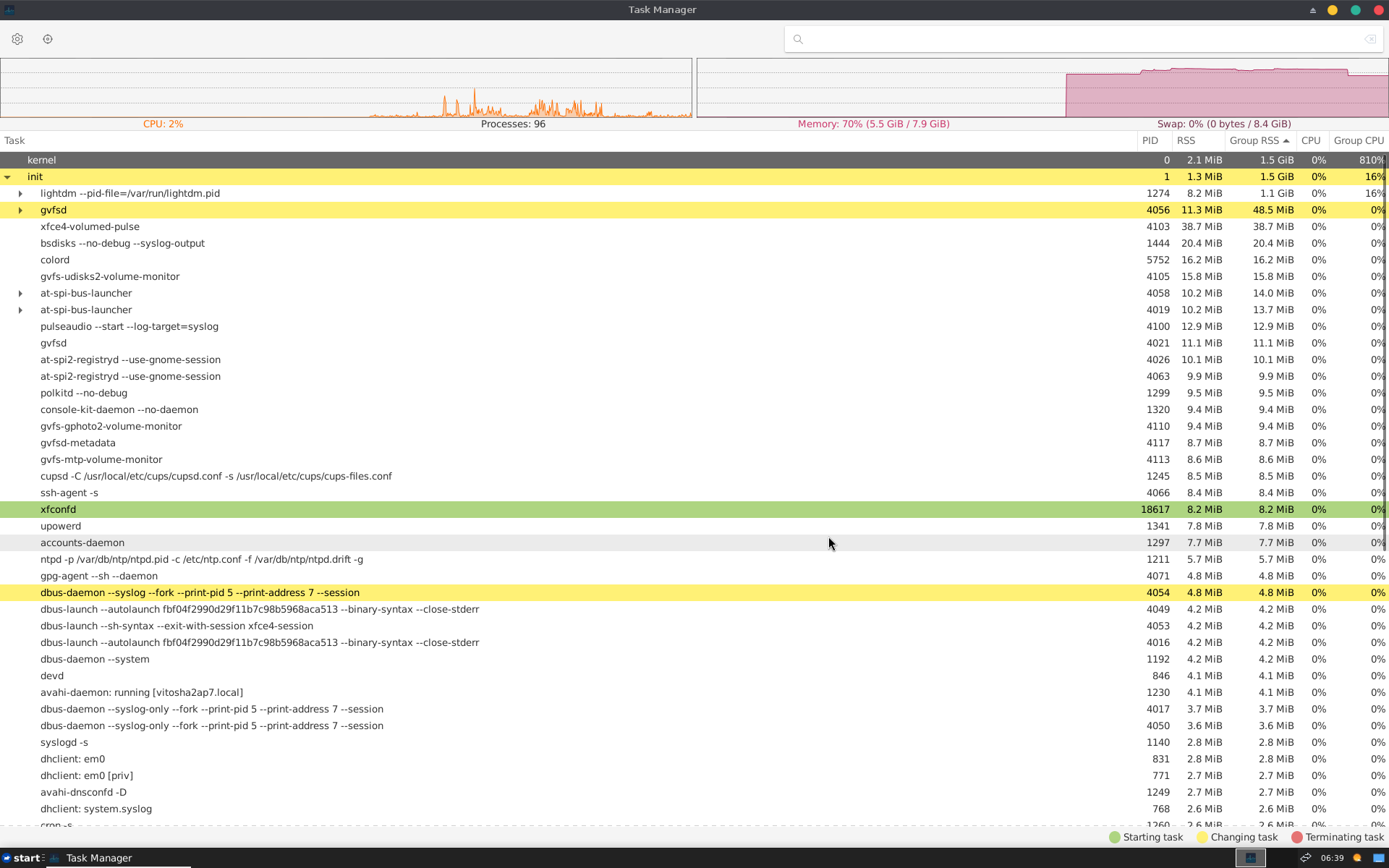
please help.png


I am providing you with a screenshot of the Task manager screen.. I want to ask :
How can I decrease the RAM usage???
I have no practically NO running programs and still 5-6 GB are being used only to support the system?
I know that the hardware I have is junk (the components are truly old) but still.. it seems I did something wrong during installation of GhostBSD??
If I try to do a FreeBSD installation do you think I would have a lower RAM usage (after I install X and xfce [and everything else that I need to have to be able to simply use my pc for ordinary everyday tasks-email, browsing, etc]) ?
Please advise!
 
I installed GhostBSD
Not supported here.


If I try to do a FreeBSD installation do you think I would have a lower RAM usage
Unused memory is useless. So you're going to find all your memory being used after a while. Mostly caches (process cache, filesystem cache, etc). Those will get evicted as soon as an application requires it. There's barely any swap in use, but even a bit of swap usage isn't a problem, it's constantly swapping pages in and out that would kill performance. That doesn't seem to be the case here.
 
How can I decrease the RAM usage???
Stop running background programs you don't need! This may require some research on your part. Though, the taskmanager output doesn't seem to show excessive RAM usage. As pointed out above, memory used in caching can be easily put to other use when needed so don't be alarmed by the "free memory" number!
 
have no practically NO running programs and still 5-6 GB are being used only to support the system?

Well ya... but like you are being told on this thread -- Unix/*BSD/Linux will use whatever RAM you have. It's not wasting the memory it's just purposing the memory.

On Linux systems they actually "cache" parts of the Linux file system into RAM memory :cool: -- for the longest time I used to watch my Linux systems (Mint at the time) run "completely out of RAM" because the O/S was caching the part of my Linux file system into RAM so that when the O/S opened a file -- the file (might?) already be cached into memory. Was this a problem?

Nawww -- Unix/*BSD/Linux systems use SWAP space if they really need extra memory -- and (a lot more often) they will EVICT other things from RAM to free up RAM on-the-fly. If you look at the screen shot you sent you have 8.4GB of swap available for (whatever). And it's completely OK to use swap space -- that's what swap is for.

In short -- these systems are "designed" to use RAM and swap this way, and have been designed like this for decades. You are all good !

You (might) want to try FreeBSD? :cool: (shameless plug !)
 
Dear all,
I installed GhostBSD (with xfce) yesterday. I originally wanted to start directly with FreeBSD but was afraid that I wouldn't be able to set it up correctly (I have used Debian a little bit but only as an ordinary user without sufficient technical knowledge but I recently started informing about BSD and decided to try a compromise - GhostBSD) .
View attachment 25969

I am providing you with a screenshot of the Task manager screen.. I want to ask :
How can I decrease the RAM usage???
I have no practically NO running programs and still 5-6 GB are being used only to support the system?
I know that the hardware I have is junk (the components are truly old) but still.. it seems I did something wrong during installation of GhostBSD??
If I try to do a FreeBSD installation do you think I would have a lower RAM usage (after I install X and xfce [and everything else that I need to have to be able to simply use my pc for ordinary everyday tasks-email, browsing, etc]) ?
Please advise!
To get started I would simply install a base FreeBSD system the add a minimal GUI. I started with XFCE as I think most people do but realised it had too much stuff which I didn't need. Nowadays I just install xorg, lxde-meta and chromium. That should be enough to get you started. Also start the GUI using startx after you login.

I'm not sure if you need to install drm-kmod although I always do.

My 16yr old system works reasonably well, although I'm hoping to add more RAM to the existing 4GB.

PS what did you use to produce your graph?
 
solstis use top -osize and top -ores to see what is using that memory. Look at the top users and look up those processes on google to see what they are and if they are actually taking an unreasonable amount of RAM for what they're doing.

It is easier to start from a console login and see if RAM usage is high there then look at what your desktop environment, xfce, loads up automatically, then chain reactions from loading GTK apps and your browser.

Starting from a "friendly" system means that if you want your system to be lean, you have to undo all the things it does just in case some user might need it. You should also use FreeBSD tools to examine RAM usage since most tools are not written for FreeBSD's memory management system.
 
Back
Top