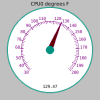
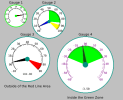
c++ -o fltk_temp $(fltk-config --cxxflags) Fl_Gauge.cxx fltk_temp.cpp $(fltk-config --ldflags)./fltk_temp
#include <stdio.h>
#include <stdlib.h>
#include <string.h>
#include <sys/types.h>
#include <sys/sysctl.h>

int main(void) {
  u_int val[3] = {0};
  char buf[256] = {""};
  size_t len = sizeof(val);
  size_t len2 = sizeof(buf);
  if (0 != (sysctlbyname("dev.cpu.0.temperature", &val, &len, NULL, 0))) {
    if (0 != (sysctlbyname("dev.aibs.0.%desc", buf, &len2, NULL, 0))) {
      puts("failed!");
      return EXIT_FAILURE;
    }
  }
  if (0 != (strcmp(buf, "")))
    printf("%s\n", buf);
  else
    printf("%lu\n", (unsigned long)val[0]);

  return EXIT_SUCCESS;
}The driver supports an arbitrary set of sensors, provides descriptions regarding what each sensor is used for...
buf is the place, and len2 is the maximum number of characters that can be put there.
Sometimes I have seen examples in brackets.static int foo_widgets = 5;
static int foo_widgets = [5];
int top = -1;                           // - top most postion of stack.
#define MAX 5                           // - max size of the stack.

/**
 * @brief Pushes a char onto the stack.
 *
 * @param (char) c  - Character to push.
 * @param (unsigned char *) stack - stack to write to.
 */
static void push(unsigned char c, unsigned char *stack) {
  if (top < MAX - 1)
    stack[++top] = c;
}

/**
 * @brief Pops a char off the stack.
 *
 * @param (unsigned char *) stack - stack to read from.
 *
 * @return (unsigned char) either the top of the stack or 0.
 */
static unsigned char pop(unsigned char *stack) {
  if (top > -1)
    return stack[top--];
  else
    return 0;
}

/**
 * @brief Gets a char from the stack.
 *
 * @param (unsigned char *) stack - stack to read from.
 *
 * @return (unsigned char) either item from stack at postion.
 */
static unsigned char get(unsigned char *stack, int pos) {
    return stack[pos];
}

int main() {

  // Let's create an array to store some commands. We'll construct an
  // array for easy access or alterations.
  const char *temp[MAX];
  temp[0] = "sysctl -n dev.cpu.0.temperature";
  temp[1] = "sysctl -n dev.cpu.1.temperature";
  temp[2] = "sysctl -n dev.cpu.2.temperature";
  temp[3] = "sysctl -n dev.cpu.3.temperature";
  temp[4] = "sysctl -n dev.cpu.3.temperature";

  unsigned char stack[MAX] = {0};       // - A storage stack.
                                        // - Save the contents upon exit and retrieve upon
                                        //   start to keep/show previous values.

  /* ---[ DEMONSTRATION ]-------------------------------------------- */
  /* The code directly below is demonstration of a stack - see also the
   * more realistic section below.
   */
  const char *buffer[] = {"44", "43", "42", "41", "40", NULL};      // - Manually fill a buffer.

  // Print the buffer contents (for demonstation).
  for (int i = 0; i < MAX; i++) {
      printf("buffer[%d]: %s", i, buffer[i]);
      printf("\tchar: %c\n", (unsigned char)strtol(buffer[i], (char **)NULL, 10));
  }

  // push items onto the the stack.
  for (int i = 0; i < MAX; i++) {
      push((unsigned char)strtol((char *)buffer[i], (char **)NULL, 10), stack);
  }

  /* ---[ MORE REALISTIC ]------------------------------------------- */
  /* The below code was typed blind (replace with actual code) but the following should be close */
//:~    char *buffer = NULL;                  // - A char array to read value.
//:~    FILE *fp = NULL;
//:~    for (int i = 0; temp[i]; i++) {
//:~      fp = popen(temp[i], "r");
//:~      if (!fp) return 1;
//:~      while (fgets(buffer, sizeof(buffer), fp) != NULL) {
//:~        push((unsigned char)strtol(buffer, (char **)NULL, 10), stack);
//:~      }
//:~      fclose(fp);
//:~    }

  // Print the results of the stack.
  // NOTE: `get()` will retrieve an item based on the given index but `pop()` will just pop off the top-most stack entry.
  for (int i = 0; i < MAX; i++ ) {
//:~      printf("System Command Output Stored in Stack[%d]: %d \n", top, pop(stack));
    printf("Output Stored in Stack[%d]: %d \n", i, get(stack, i));
  }

}@brief Pops a char off the stack.
  Type                    Minimum size (bits)      Minimum range / precision
+-----------------------+------------------------+-----------------------------------------+
  char                    8                        -127 to 127
  unsigned char           8                        0 to 255
  int                     16                       -32767 to 32767
  unsigned int            16                       0 to 65535
...Nuggets like this are indispensable. I see it so much and don't quite get it.'i' is always a counter",
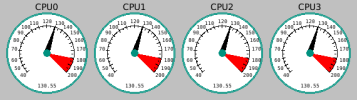
dd and never realized what it meant.I just built 4 and kept them around in an array of structures:I haven't been able to read all the thread but I thought I'd toss out the idea of using a stack to keep/store values in between runs.
#include <sys/types.h>
#include <sys/sysctl.h>
#include <FL/Fl.H>
#include <FL/Fl_Window.H>

#include "Fl_Gauge.H"

struct cbdata {
  char* sysctl_name;
  Fl_Gauge* gauge;
};

void gaugecb(void* p_data) {
  int t_dK; //Default is deciKelvin see SYSCTL_ADD_PROC(9)
  float t_C, t_F;
  size_t size = sizeof t_dK;
  struct cbdata* data = (struct cbdata*)p_data;

  if (0 == (sysctlbyname(data->sysctl_name, &t_dK, &size, NULL, 0))) {
    t_C = (float)(t_dK - 2732) / 10;
    t_F = (t_dK * 1.8 / 10) - 459.67;
    //printf("%d dK, %f C, %f F\n", t_dK, t_C, t_F);
  } else {
    perror("Could not get the CPU temperature");
  }

  data->gauge->value(t_F);
  data->gauge->redraw();

  Fl::repeat_timeout(1.0, gaugecb, p_data);
}

int main(int argc, char** argv) {
  char* temp;
  struct cbdata l_cbdata[4];
  Fl_Gauge* gauge;
  Fl_Window* window = new Fl_Window(570, 160, "CPU Temperature in degrees F");

  for(int i = 0; i < 4; i++)
  {
    asprintf(&temp, "CPU%d", i);
    gauge = new Fl_Gauge(10 + i * 140, 20, 130, 130, temp);

    gauge->value(0);
    gauge->stepdiv(5);
    gauge->redlinemode(FL_GAUGE_RL_ON);

    gauge->odoincsize(1.0);
    gauge->v2mode(FL_GAUGE_V2_V1);
    gauge->min(40);
    gauge->max(200);
    gauge->redlinestart(180.00);
    gauge->fontsize(8);

    asprintf(&temp, "dev.cpu.%d.temperature", i);
    l_cbdata[i].sysctl_name = temp;
    l_cbdata[i].gauge = gauge;
  }

  window->end();
  window->show(argc, argv);
  for(int i = 0; i < 4; i++)
  {
    Fl::add_timeout(1.0, gaugecb, &(l_cbdata[i]));
  }

  return Fl::run();
} 0 nul 1 soh 2 stx 3 etx 4 eot 5 enq 6 ack 7 bel
8 bs 9 ht 10 nl 11 vt 12 np 13 cr 14 so 15 si
16 dle 17 dc1 18 dc2 19 dc3 20 dc4 21 nak 22 syn 23 etb
24 can 25 em 26 sub 27 esc 28 fs 29 gs 30 rs 31 us
32 sp 33 ! 34 " 35 # 36 $ 37 % 38 & 39 '
40 ( 41 ) 42 * 43 + 44 , 45 - 46 . 47 /
48 0 49 1 50 2 51 3 52 4 53 5 54 6 55 7
56 8 57 9 58 : 59 ; 60 < 61 = 62 > 63 ?
64 @ 65 A 66 B 67 C 68 D 69 E 70 F 71 G
72 H 73 I 74 J 75 K 76 L 77 M 78 N 79 O
80 P 81 Q 82 R 83 S 84 T 85 U 86 V 87 W
88 X 89 Y 90 Z 91 [ 92 \ 93 ] 94 ^ 95 _
96 ` 97 a 98 b 99 c 100 d 101 e 102 f 103 g
104 h 105 i 106 j 107 k 108 l 109 m 110 n 111 o
112 p 113 q 114 r 115 s 116 t 117 u 118 v 119 w
120 x 121 y 122 z 123 { 124 | 125 } 126 ~ 127 delAh, yes; watch for the preprocessor directives too (those can get ya sometimes). You'll also see "while 1 ..." (or "for (;I had some experience with if-than go-to loops with Pet basic. That is about it.
Nuggets like this are indispensable. I see it so much and don't quite get it.
if 0
To do nothing with code is interesting...
I find it amusing I am using if-of withddand never realized what it meant.
 ") ... a lot. Which you shouldn't "technically do" but...