
Floppy disk image popping during boot after install

Hi Experts,

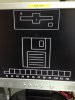
Just finished installing a FreeBSD 10.0 in an IBM M2 server. successfull install but after reboot, and while booting, the image attached pops up. When I press F1, it goes to a booting screen again and this on the image pops up. Can't really get out of it. any hints please? thanks.
 

Attachments

  • IMG_2166.jpg
    IMG_2166.jpg
    63.2 KB · Views: 1,207
This isn't anything FreeBSD produces or would show. I'm guessing it's the machine's BIOS.
 
BIOS confusion with GPT or PMBR, maybe. IBM has a history of doing silly things with disk partitions. One workaround would be to use MBR instead of GPT when installing FreeBSD. A better solution would be an updated BIOS, if that is the problem.

Oh, and then there's the active slice setting. On a strict UEFI machine, if the single PMBR slice is set active, it will not boot. On a strict BIOS machine, if the single PMBR slice is *not* set active, it will not boot (but this is supposed to be rare).
 
Alright, that means this is really a hardware thing. I need to get the BIOS updated right? That is the best way for now. Will do this and will show you an update.
 
Thanks to all, after upgrading the BIOS/UEFI, it doesn't show up. Unfortunately another problem comes up, searched it all over and I couldn't get one link.

It just shows :
Code:
Boot Failed. Hard Disk 0
Press any key to contnue
Anybody had this same problem before?
 
Back
Top