dell inspiron 5620 sound

Hi all

I can't configure sound. I used gemini, grok... and no sound

Can anyone help me ?


1782211867493.png
 
"It doesn't work" doesn't give us a lot of information to work with.

So, let's start with the basics, what does cat /dev/sndstat output? And where is the audio supposed to be heard? Headphones? External speakers? Monitor speakers?
 
"It doesn't work" doesn't give us a lot of information to work with.

So, let's start with the basics, what does cat /dev/sndstat output? And where is the audio supposed to be heard? Headphones? External speakers? Monitor speakers?

I have no sound on internal speaker or headphones.


Code:
[root@belesh-bsd ~]# cat /dev/sndstat
FreeBSD Audio Driver
Installed devices:
pcm0: <Cirrus Logic (0x8409) (Right Analog)> on hdaa0 (1p:1v/1r:1v) default
    snddev flags=0x30bc<SOFTPCMVOL,BUSY,MPSAFE,REGISTERED,VPC,PVCHANS,RVCHANS>
    [dsp0.play.0]: spd 48000, fmt 0x00200010, flags 0x00002108, 0x00000004
        interrupts 274926, underruns 0, feed 274926, ready 0
        [b:2048/1024/2|bs:2048/1024/2]
        channel flags=0x2108<TRIGGERED,BUSY,HAS_VCHAN>
        {userland} -> feeder_mixer(0x00200010) -> {hardware}
    dsp0.play.0[dsp0.virtual_play.0]: spd 44100/48000, fmt 0x00200010, flags 0x100011c8, 0x00000029, pid 6227 (pulseaudio)
        interrupts 0, underruns 0, feed 290644, ready 15444
        [b:0/0/0|bs:16384/4096/4]
        channel flags=0x100011c8<TRIGGERED,NBIO,MMAP,BUSY,HAS_SIZE,VIRTUAL>
        {userland} -> feeder_root(0x00200010) -> feeder_volume(0x00200010) -> feeder_rate(0x00200010 q:1 44100 -> 48000) -> {dsp0.play.0}
    [dsp0.record.0]: spd 48000, fmt 0x00200010, flags 0x00002108, 0x00000005
        interrupts 0, overruns 0, feed 0, hfree 512, sfree 512
        [b:512/256/2|bs:512/256/2]
        channel flags=0x2108<TRIGGERED,BUSY,HAS_VCHAN>
        {hardware} -> feeder_root(0x00200010) -> feeder_mixer(0x00200010) -> {userland}
    dsp0.record.0[dsp0.virtual_record.0]: spd 44100/48000, fmt 0x00200010, flags 0x100011c8, 0x00000029, pid 6227 (pulseaudio)
        interrupts 0, overruns 0, feed 0, hfree 0, sfree 16384
        [b:0/0/0|bs:16384/4096/4]
        channel flags=0x100011c8<TRIGGERED,NBIO,MMAP,BUSY,HAS_SIZE,VIRTUAL>
        {dsp0.record.0} -> feeder_root(0x00200010) -> feeder_rate(0x00200010 q:1 48000 -> 44100) -> feeder_volume(0x00200010) -> {userland}
pcm1: <Cirrus Logic (0x8409) (Internal Analog Speaker)> on hdaa0 (1p:1v/0r:0v)
    snddev flags=0x10bd<SIMPLEX,SOFTPCMVOL,BUSY,MPSAFE,REGISTERED,VPC,PVCHANS>
    [dsp1.play.0]: spd 48000, fmt 0x00200010, flags 0x00002108, 0x00000004
        interrupts 274926, underruns 0, feed 274926, ready 0
        [b:2048/1024/2|bs:2048/1024/2]
        channel flags=0x2108<TRIGGERED,BUSY,HAS_VCHAN>
        {userland} -> feeder_mixer(0x00200010) -> {hardware}
    dsp1.play.0[dsp1.virtual_play.0]: spd 44100/48000, fmt 0x00200010, flags 0x100011c8, 0x00000029, pid 6227 (pulseaudio)
        interrupts 0, underruns 0, feed 290649, ready 15560
        [b:0/0/0|bs:16384/4096/4]
        channel flags=0x100011c8<TRIGGERED,NBIO,MMAP,BUSY,HAS_SIZE,VIRTUAL>
        {userland} -> feeder_root(0x00200010) -> feeder_volume(0x00200010) -> feeder_rate(0x00200010 q:1 44100 -> 48000) -> {dsp1.play.0}
No devices installed from userspace.

Code:
[root@belesh-bsd ~]# dmesg | grep pcm
pcm0: <Cirrus Logic (0x8409) (Right Analog)> at nid 36 and 52 on hdaa0
pcm1: <Cirrus Logic (0x8409) (Internal Analog Speaker)> at nid 44 on hdaa0
pcm0: detached
pcm1: detached
pcm0: <Cirrus Logic (0x8409) (Right Analog)> at nid 36 and 52 on hdaa0
pcm1: <Cirrus Logic (0x8409) (Internal Analog Speaker)> at nid 44 on hdaa0
pcm0: detached
pcm1: detached
pcm0: <Cirrus Logic (0x8409) (Right Analog)> at nid 36 and 52 on hdaa0
pcm1: <Cirrus Logic (0x8409) (Internal Analog Speaker)> at nid 44 on hdaa0
pcm0: <Cirrus Logic (0x8409) (Right Analog)> at nid 36 and 52 on hdaa0
pcm1: <Cirrus Logic (0x8409) (Internal Analog Speaker)> at nid 44 on hdaa0
pcm0: <Cirrus Logic (0x8409) (Right Analog)> at nid 36 and 52 on hdaa0
pcm1: <Cirrus Logic (0x8409) (Internal Analog Speaker)> at nid 44 on hdaa0
[root@belesh-bsd ~]#


Code:
[root@belesh-bsd ~]# kldstat | grep snd
 2    1 0xffffffff8214e000     4708 snd_driver.ko
 3    2 0xffffffff82153000    1b550 snd_uaudio.ko
 4    2 0xffffffff8216f000     7290 snd_vibes.ko
 5    2 0xffffffff82177000     5c10 snd_via82c686.ko
 6    2 0xffffffff8217d000     5cc0 snd_t4dwave.ko
 7    4 0xffffffff82183000     31d8 snd_spicds.ko
 8    2 0xffffffff82187000     7648 snd_solo.ko
 9    2 0xffffffff8218f000    12298 snd_neomagic.ko
10    2 0xffffffff821a2000     c030 snd_maestro3.ko
11    2 0xffffffff821af000     bbd8 snd_hdspe.ko
12    2 0xffffffff821bb000     ace0 snd_hdsp.ko
13    2 0xffffffff821c6000     47c0 snd_fm801.ko
14    2 0xffffffff821cb000     8c08 snd_envy24ht.ko
15    2 0xffffffff821d4000     9fa0 snd_envy24.ko
16    2 0xffffffff821de000     5ca8 snd_cs4281.ko
17    2 0xffffffff821e4000     7cc8 snd_atiixp.ko
18    2 0xffffffff821ec000     61b8 snd_als4000.ko

Code:
[root@belesh-bsd ~]# grep snd /boot/loader.conf
hw.snd.verbose=2
snd_driver_load="YES"
 
Remove that snd_driver_load from loader.conf. It's a stub to load all available sound card drivers, useful if you need to find out which driver you actually need. Not intended to be used permanently.

What's being detected is snd_hda(4), this driver is already included in the GENERIC kernel, so you don't need to explicitly load it.

no sound on internal speaker
That's probably this one:
Code:
pcm1: <Cirrus Logic (0x8409) (Internal Analog Speaker)> on hdaa0 (1p:1v/0r:0v)

But pcm0 is set as default output. So switch outputs: sysctl hw.snd.default_unit=1 Then try to play something. If you get audio, make this setting 'permanent' by adding hw.snd.default_unit=1 to /etc/sysctl.conf.
 
Remove that snd_driver_load from loader.conf. It's a stub to load all available sound card drivers, useful if you need to find out which driver you actually need. Not intended to be used permanently.

What's being detected is snd_hda(4), this driver is already included in the GENERIC kernel, so you don't need to explicitly load it.


That's probably this one:
Code:
pcm1: <Cirrus Logic (0x8409) (Internal Analog Speaker)> on hdaa0 (1p:1v/0r:0v)

But pcm0 is set as default output. So switch outputs: sysctl hw.snd.default_unit=1 Then try to play something. If you get audio, make this setting 'permanent' by adding hw.snd.default_unit=1 to /etc/sysctl.conf.
I removed snd_driver_load from loader.conf and ran sysctl hw.snd.default_unit=1

Code:
[root@belesh-bsd ~]# sysctl hw.snd.default_unit=1
hw.snd.default_unit: 0 -> 1


but no sound at firefox and mplayer and others

and interesting pulseaudio cpu usage 99%

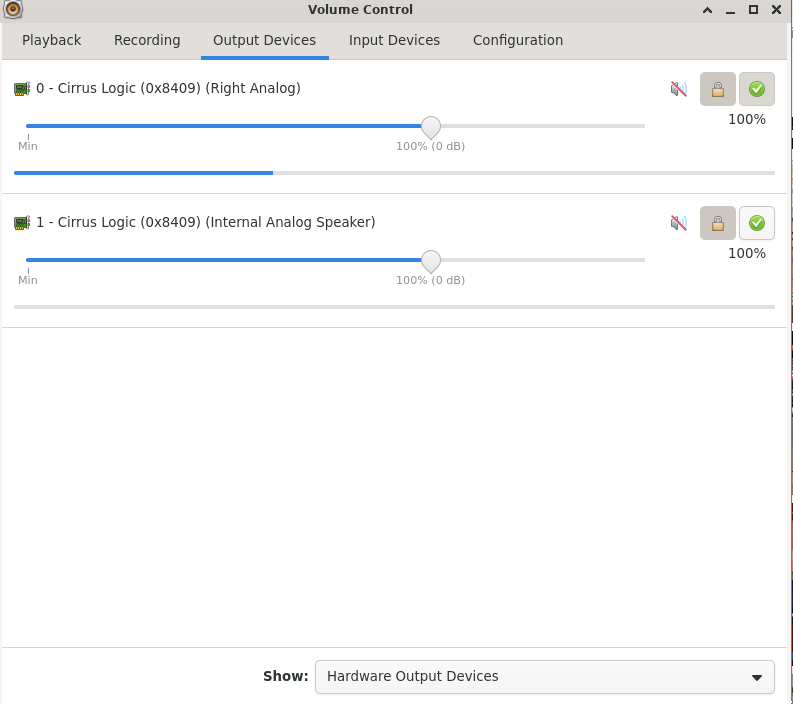
1782223126118.png
 
Pulseaudio adds a whole other layer of potential audio issues. Try mplayer again but make sure it's not trying to output via pulseaudio. It should be able to use OSS directly. Make sure that direct connection works, then we'll worry about pulseaudio.
 
Back
Top