Other Colon Slash Slash Slash

The file managers of some DEs including Xfce use the mounts of
computer:///
network:///
recent:///
and
trash:///

Where are these mounted and where are they defined? How can I change them?
 
Those are URI, not mounts. Many file managers of modern desktop environments are basically a web browser window nowadays.

URI = scheme ":" ["//" authority] path ["?" query] ["#" fragment]
 
IIRC gvfs uses XDG.
And where are the XDG definitions?

Cannot see anything that relates to trash, recent, etc.

Code:
XDG_CACHE_HOME=/home/geezer/.cache
XDG_CONFIG_DIRS=/etc/xdg:/usr/local/etc/xdg
XDG_CONFIG_HOME=/home/geezer/.config
XDG_CURRENT_DESKTOP=XFCE
XDG_DATA_DIRS=/usr/local/share:/usr/share
XDG_GREETER_DATA_DIR=/var/lib/lightdm-data/geezer
XDG_MENU_PREFIX=xfce-
XDG_RUNTIME_DIR=/var/run/user/1000
XDG_SEAT=seat0
XDG_SEAT_PATH=/org/freedesktop/DisplayManager/Seat0
XDG_SESSION_COOKIE=host.name-1749363737.977366-439212372
XDG_SESSION_DESKTOP=xfce
XDG_SESSION_PATH=/org/freedesktop/DisplayManager/Session0
XDG_SESSION_TYPE=x11
XDG_VTNR=8
 
There should be a pointer to .local/share/Trash. Your trash files should be saved in a subdirectory called files. I think Thunar simply defaults.

It's been a while since I used xfce, lxde, gnome, or kde on FreeBSD. I know XDG is a thing at $JOB WRT the various apps my customers use (on linux). If the environment isn't set up correctly things break.

IMO it's held together by bubble gum and string.
 
From the post below it looks like gio list URI will show you the path pointed to by Trash:// or any of the other ones. Sorry for lack of formatting on the link im still getting the hang of the BB codes.

https://forum.xfce.org/viewtopic.php?id=13108

gio is interesting and useful, but gio list trash:/// shows the files in the trash (or in my case it does not). It can make new mounts, but does not show the "path pointed to" of trash (or recent or network).
 
Geezer

you seem to wonder alot about trash:

your question is "And where are the XDG definitions?"

it is just making use of the file uri and your environment variables.

search Google for the standard for exchanging files "file-uri-spec.txt"
see also:

you can use a web browser to browse local files as long as the path is correctly set and specified.
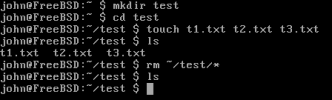
so from your home directory (~):
links file://.local/share/Trash/files

making use of your $HOME environment variable
if you are not in your $HOME path, then links will complain and you will have to specify the full path:
so from the /bin folder, use a relative path:
file://../home/john/.local/share/Trash/files

or

file:///home/john/.local/share/Trash/files
file://$HOME/.local/share/Trash/files

~/. local/share/ is a default value for the $XDG_DATA_HOME environment variable.
see the XDG Base Directory Specification for more info:

XDG apps simply do it for you but they do not need to redefine that which is already defined in the UNIX system (environment variables) or the XDG Base Directory Specification.
 

Attachments

  • roll_your_own_trash.png
    roll_your_own_trash.png
    3.4 KB · Views: 65
Geezer

you seem to wonder alot about trash:

Yes. Thank you for remembering a previous thread.

At that time, I wanted to move trash out of my home directory. If I backup my entire home directory, I did not need to backup a whole bunch of deleted files.

So I moved trash from ~/.local/share/Trash to /home/.Trash/1000, and symlinked it. It worked.

Lately, I think since the last or second last poudriere bulk build and pgk update, thunar does not show any files in trash:///

I know that trash is still working, because I can see the files in there. I can even delete files in thunar and they go to the trash folder. In fact, I can still use the trash features of empty and restore if I use xfe file manager, which does not (seem to) know about these gvfs mounts.

But now, something having become corrupted, in thunar (and nautilus) and gio,
trash:/// and network:/// do not show anything.
computer:///, recent:/// and (thankfully) file system:/// work as before.
 
well, linking to the old thread is that i notice that you spend alot of time tinkering with trash :)

I have Thunar but i do not manage the trash using Thunar. I use shell commands, which are quite simple. I remember when i first started using FreeBSD and xfce4 that my trash didn't work at all. Now it functions but i do not know what i did in the process of tinkering with the system that made it work. Even xfe didn't function. I think that dbus is necessary and maybe Thunar uses a daemon? I have searched Google and i see many complaints regarding trash and network.

have you tried the following solution?

$ exo-open trash:///
also fails?

have you tested gvfs-trash directly?
$ gvfs-trash [OPTION...] [LOCATION...]

did you change the mappings?
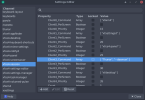
$HOME/.config/Thunar/accels.scm
;(gtk_accel_path"<Actions>/ThunarWindow/open-trash" "")

something must have changed somewhere that is creating this problem. Try to remember if you were tinkering around with any configuration files.
 
i notice that you spend alot of time tinkering with trash
It seems I do spend a lot of time tinkering.

but i do not know what i did in the process of tinkering with the system that made it work.
It seems you spend time tinkering too.

I do like Xfce. Although, for a lightweight DE, it has got rather heavy and convoluted. Lately, I have been tinkering (cough, cough) with wayland, but IMO there is nothing that is quite good enough so far.

have you tried the following solution?
Changed the linuxy kludge for freebsd, but it did not work.

$ exo-open trash:///
also fails?
Also fails.

have you tested gvfs-trash directly?
$ gvfs-trash [OPTION...] [LOCATION...]
I do not have gvfs-trash. /usr/local/libexec/gvfsd-trash is already running, as is /usr/local/libexec/gvfsd and a bunch of spawned processes. Have tinkered (again) with these to no success.

did you change the mappings?
$HOME/.config/Thunar/accels.scm
;(gtk_accel_path"<Actions>/ThunarWindow/open-trash" "")
No, I seem to have the default accels.

something must have changed somewhere that is creating this problem. Try to remember if you were tinkering around with any configuration files.
Er, yes.
 
It seems you spend time tinkering too.
not with trash and so much to make multiple threads :-) and i am new to FreeBSD, so tinkering is my introduction to the Nix world coming from Windows.

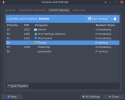
I don't know if you have checked that the Thunar daemon is running or not.
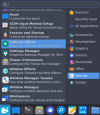
I find the list of running processes in Settings > Session and Startup > Current Session
if Thunar is not running, then try starting the daemon:

$Thunar --daemon
 

Attachments

  • Thunar--daemon_settings.png
    Thunar--daemon_settings.png
    64.3 KB · Views: 69
  • settings-editor.png
    settings-editor.png
    70.9 KB · Views: 64
  • session-and-startup.png
    session-and-startup.png
    33.1 KB · Views: 70
Back
Top