Apache24 + php55 + php55-extension

Hello,

I just installed Apache24 on my FreeBSD server. It runs just fine.
After that, I installed php55 and php55-extension because I need to use mysqli. The problem is that the PHP scripts are not executed. I tried:
Code:
<?php
phpinfo();
?>
That didn't work. I did
Code:
 <?php
echo "Hey. I'm working!!!!";
?>
That didn't work either. Still, I have spotted something strange: if I do
Code:
<?php
<p> HEY </p>
echo "hello";
?>
I see
Code:
HEY
echo "hello";?>
The PHP script looks like it's just parsed to HTML without getting executed... What could be the problem???
 
This means that your webserver is not executing the PHP-Scripts. Have you configured Apache to execute PHP?

Check it the following line is in your /usr/local/etc/apache24/httpd.conf
Code:
LoadModule php5_module        libexec/apache22/libphp5.so
 
The module is loaded.
apachectl -t -D DUMP_MODULES returns php5_module as being loaded

I had to add to httpd.conf
Code:
<FilesMatch \.php$>
SetHandler application/x-httpd-php
</FilesMatch>
And it's working now. Thank you anyway :)
 
Code:
root@molly:~ # cd /usr/ports/lang/php55
root@molly:/usr/ports/lang/php55 # cat pkg-message.mod
***************************************************************

Make sure index.php is part of your DirectoryIndex.

You should add the following to your Apache configuration file:

AddType application/x-httpd-php .php
AddType application/x-httpd-php-source .phps

***************************************************************
 
Now, I know the problem is already solved but I'd still like to suggest a "cleaner" solution. At the very least one which will be much easier to administer (keep in mind what could happen if you change PHP versions; perhaps you'll need to change some Apache directives again).

My suggestion: /usr/local/etc/apache22/Includes/php_settings.conf.

Everything which involves around PHP configuration gets neatly stored in one single file. Only problem this brings in is when you're sometimes trying to help people; I never manage to recall if I had made this file myself or if it got automatically installed (some of the files here are automatically installed) ;)

Alas:

Code:
$ less php_settings.conf
#
# Cause the PHP interpreter to handle files with a .php extension.
#
AddHandler php5-script .php
AddType text/html .php

#
# Add index.php to the list of files that will be served as directory
# indexes.
#
DirectoryIndex index.php
This way you don't have to go through a 40k configuration file to find one specific configuration block.
 
Hello everybody.
I have the following problem.

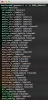
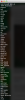
I'm Apache24 (IMG.1) + PHP55, extensions (IMG.2) are in the directory but not load on Apache.
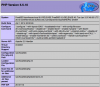
The extensions are in the directory: /usr/local/etc/php/extensions.ini. Even in php_info() including the file, extensions are not loaded (IMG.3).
Someone is having the same problem?


-- All Config
Code:
kamihouse# service apache24 configtest
Performing sanity check on apache24 configuration:
Syntax OK
kamihouse# 
kamihouse# 
kamihouse# apachectl -v
Server version: Apache/2.4.9 (FreeBSD)
Server built:   Apr  1 2014 22:36:46
kamihouse# 
kamihouse# 
kamihouse# /usr/local/bin/php-cgi -v
PHP 5.5.10 (cgi-fcgi) (built: Apr  1 2014 23:18:48)
Copyright (c) 1997-2014 The PHP Group
Zend Engine v2.5.0, Copyright (c) 1998-2014 Zend Technologies
    with Zend OPcache v7.0.3, Copyright (c) 1999-2014, by Zend Technologies
kamihouse# 
kamihouse# 
kamihouse# php -v
PHP 5.5.10 (cli) (built: Apr  1 2014 23:18:45) 
Copyright (c) 1997-2014 The PHP Group
Zend Engine v2.5.0, Copyright (c) 1998-2014 Zend Technologies
    with Zend OPcache v7.0.3, Copyright (c) 1999-2014, by Zend Technologies
kamihouse# 
kamihouse# 
kamihouse# apachectl -v
Server version: Apache/2.4.9 (FreeBSD)
Server built:   Apr  1 2014 22:36:46
kamihouse#
 

Attachments

  • Captura de Tela 2014-04-01 às 21.03.01.png
    Captura de Tela 2014-04-01 às 21.03.01.png
    142.5 KB · Views: 2,265
  • Captura de Tela 2014-04-01 às 21.09.57.png
    Captura de Tela 2014-04-01 às 21.09.57.png
    106 KB · Views: 2,086
  • Captura de Tela 2014-04-01 às 20.40.08.png
    Captura de Tela 2014-04-01 às 20.40.08.png
    95.7 KB · Views: 2,114
Back
Top