M
Mark Phillips
Guest
Original article here.
Consider this when replying.
I doubt you’ve been living under a rock for at least the last decade, so I won’t explain containers for you. I will, however, mention what the Open Container Initiative (OCI) is, since FreeBSD has just become a part of it. Quoting from their own website:
Excellent. To work within this structure, we’re going to need a tool. Enter Podman:
There’s our ground rules set. Let’s see if Podman’s use of the word ‘simple’ matches the promise.
I’m starting here from a fresh, clean, installation of FreeBSD 15.0-BETA3, but I’ve also tested this on the current stable release, 14.3, and it’s all the same. Let’s install the required packages:
Podman will by default store containers in
If we want to access any services running in a container, we’re going to need the pf firewall. The podman package contains an example configuration, which makes life easy for us:
Don’t forget to update the interface variables in that copied file, before you enable and start the pf service. Naturally, if you’re already running pf, and you already have a config file in place, don’t just copy this file over. Just pick the relevant bits from it and add to your existing config.
If we want to make use of any Linux-based containers, we’ll also need to enable the Linux service:
We’re ready to go. Let’s try a FreeBSD container (here we’re a normal user, so we’ll have to use privilege escalation as podman currently needs to be root — my preference is doas; it’s small and simple):
That was easy! Let’s test a Linux container:
Again, that was really easy.
You can find FreeBSD OCI images on GitHub and Docker Hub. But we imagine many people will want to consume Linux images.
I heard about Caddy a while ago, whilst discussing a massive multiplayer online gaming service with a FreeBSD-based business (that’s a whole other interesting story, for another time). A cursory look tells me it’s probably a really easy way to serve a website, securely, in a container. So I tested this theory with a Hugo-generated static site — simply serving up the
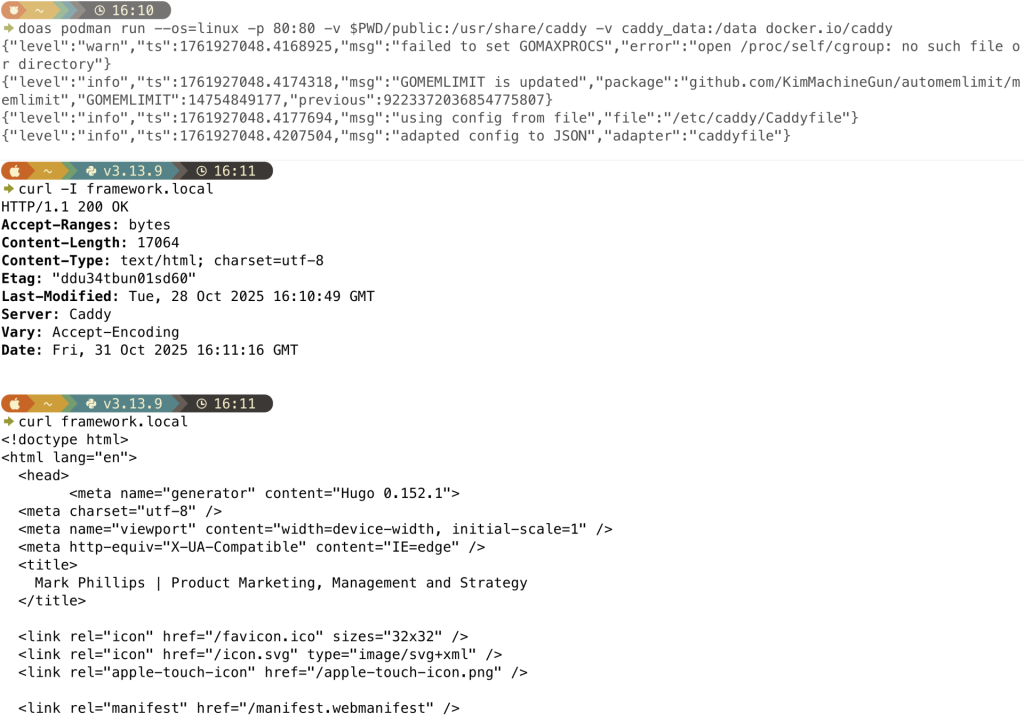
Wow, that was easy!
As well as enabling containers for existing FreeBSD users, Podman is about to introduce a whole raft of new users to FreeBSD. We’ve aslready been seeing a large uptick in new users visiting the YouTube channel and Subreddit, looking to build their digital worlds on the reknowned simplicity and reliability of FreeBSD. ZFS FTW

So, it intrigued me to try a somewhat esoteric challenge. Many years ago, I put a container onto Docker Hub. Python Pandas, on a CentOS foundation. Could I run this container on my shiny new OCI FreeBSD server?
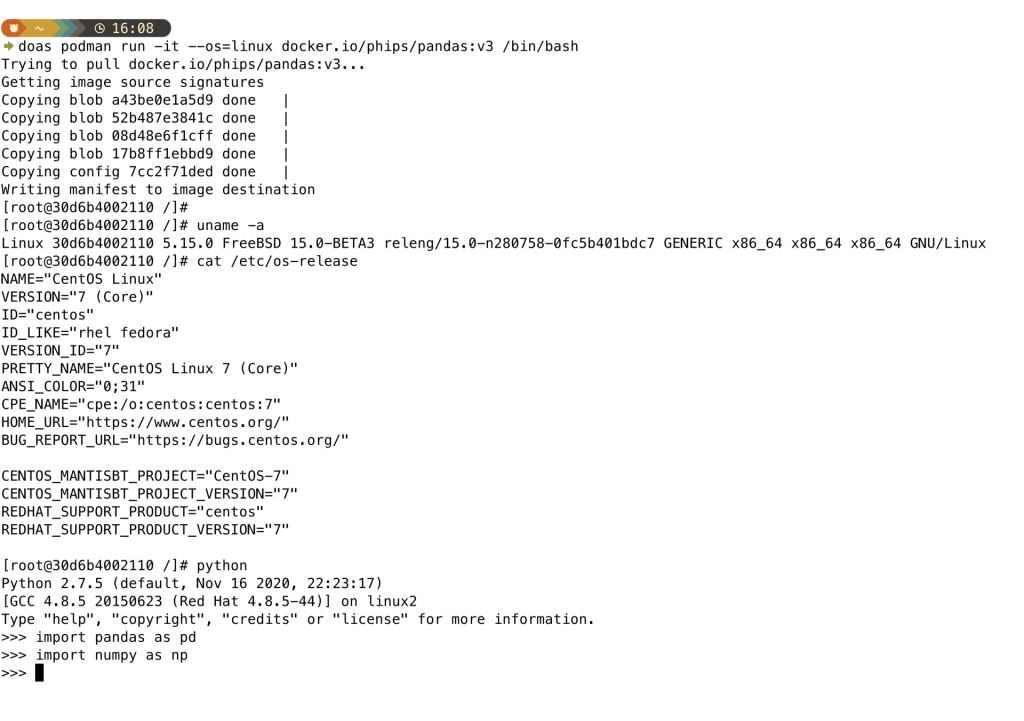
Yes! Amazing! So there’s an answer for migrating old workloads to a new platform.
There we have it. It’s easy and fast to get containers up and running on FreeBSD. Also, it’s really simple to consume aging containers — a path to migrate an underlying platform to a well-engineered, rock-solid operating system.
The FreeBSD handbook will be updated soon with proper documentation for OCI containers, but in the meantime you can peruse current Core member Dave Cottlehuber’s working documentation here.
We’re dropping new posts — and videos — for technical topics regularly. So make sure you’re subscribed to the YouTube channel and following this feed in your favorite RSS reader. There’s also the newsletter, if you’d like to receive updates by email.
We’d like this content series to be interactive too — so what would you like to see us cover? What FreeBSD questions can we help you tackle? Get in touch with your ideas.
The post An introduction to OCI Containers on FreeBSD first appeared on FreeBSD Foundation.
Continue reading...
Consider this when replying.
I doubt you’ve been living under a rock for at least the last decade, so I won’t explain containers for you. I will, however, mention what the Open Container Initiative (OCI) is, since FreeBSD has just become a part of it. Quoting from their own website:
“The Open Container Initiative (OCI) is a lightweight, open governance structure for the express purpose of creating open industry standards around container formats and runtimes.“
Excellent. To work within this structure, we’re going to need a tool. Enter Podman:
“Podman is a fully featured container engine that is a simple daemonless tool. Podman provides a Docker-CLI comparable command line that eases the transition from other container engines and allows the management of pods, containers and images“
There’s our ground rules set. Let’s see if Podman’s use of the word ‘simple’ matches the promise.
Installation and setup
I’m starting here from a fresh, clean, installation of FreeBSD 15.0-BETA3, but I’ve also tested this on the current stable release, 14.3, and it’s all the same. Let’s install the required packages:
# pkg install -y podman-suitePodman will by default store containers in
/var/db/containers, so you might like to create a dedicated ZFS filesystem for that:# zfs create -o mountpoint=/var/db/containers zroot/containersIf we want to access any services running in a container, we’re going to need the pf firewall. The podman package contains an example configuration, which makes life easy for us:
Code:
# cp /usr/local/etc/containers/pf.conf.sample /etc/pf.conf
# sysctl net.pf.filter_local=1
Don’t forget to update the interface variables in that copied file, before you enable and start the pf service. Naturally, if you’re already running pf, and you already have a config file in place, don’t just copy this file over. Just pick the relevant bits from it and add to your existing config.
Code:
# service pf enable
# service pf start
If we want to make use of any Linux-based containers, we’ll also need to enable the Linux service:
Code:
# service linux enable
# service linux start
We’re ready to go. Let’s try a FreeBSD container (here we’re a normal user, so we’ll have to use privilege escalation as podman currently needs to be root — my preference is doas; it’s small and simple):
Code:
$ doas podman run ghcr.io/freebsd/freebsd-runtime:14.3 freebsd-version
14.3-RELEASE
That was easy! Let’s test a Linux container:
Code:
$ doas podman run --rm --os=linux docker.io/alpine cat /etc/os-release | head -1
NAME="Alpine Linux"
Again, that was really easy.
You can find FreeBSD OCI images on GitHub and Docker Hub. But we imagine many people will want to consume Linux images.
Testing something useful
I heard about Caddy a while ago, whilst discussing a massive multiplayer online gaming service with a FreeBSD-based business (that’s a whole other interesting story, for another time). A cursory look tells me it’s probably a really easy way to serve a website, securely, in a container. So I tested this theory with a Hugo-generated static site — simply serving up the
public folder.$ doas podman run --os=linux -p 80:80 -v $PWD/website:/usr/share/caddy -v caddy_data:/data docker.io/caddy
Wow, that was easy!
What’s in it for me?
As well as enabling containers for existing FreeBSD users, Podman is about to introduce a whole raft of new users to FreeBSD. We’ve aslready been seeing a large uptick in new users visiting the YouTube channel and Subreddit, looking to build their digital worlds on the reknowned simplicity and reliability of FreeBSD. ZFS FTW
So, it intrigued me to try a somewhat esoteric challenge. Many years ago, I put a container onto Docker Hub. Python Pandas, on a CentOS foundation. Could I run this container on my shiny new OCI FreeBSD server?
doas podman run -it --os=linux docker.io/phips/pandas:v3 /bin/bash
Yes! Amazing! So there’s an answer for migrating old workloads to a new platform.
Quick and easy
There we have it. It’s easy and fast to get containers up and running on FreeBSD. Also, it’s really simple to consume aging containers — a path to migrate an underlying platform to a well-engineered, rock-solid operating system.
The FreeBSD handbook will be updated soon with proper documentation for OCI containers, but in the meantime you can peruse current Core member Dave Cottlehuber’s working documentation here.
We’re dropping new posts — and videos — for technical topics regularly. So make sure you’re subscribed to the YouTube channel and following this feed in your favorite RSS reader. There’s also the newsletter, if you’d like to receive updates by email.
We’d like this content series to be interactive too — so what would you like to see us cover? What FreeBSD questions can we help you tackle? Get in touch with your ideas.
The post An introduction to OCI Containers on FreeBSD first appeared on FreeBSD Foundation.
Continue reading...