ZFS After zpool upgrade can not boot

I've read the various forum entries and general searches on this. There seem to be a lot of slightly different answers, so here is my story:

I had a system that was FreeBSD 13.3. Upgraded to 14.1 no problems. Upgraded all the major software (apache, mysql, php, postfix, etc). When I did a zpool status -v poolName there were some suggestions in the status: and action: that pretty much made it look like you should really do a zpool update

When I did the update, part of the printed message was "you might need to update the boot code". Indeed, this is true. Would have been nice to have seen this in the report from the zpool status, but that water has gone under the bridge.

This is a server system, it only runs FreeBSD, everything was happy at 14.1, and now it does not boot. There are three SSDs that are mirrored. I can bring up the USB stick I have that has V14.1 on it that I use to bring up a the server in single user mode, so hopefully that means there is a way to fix this. Again, I know this has been discussed in various forum answers, but, the order in which I got into this mess is different than all the posts I have seen. This seem like a really bad sort of problem to just "start trying stuff". Plan B is nuke the system, start all over, loose a day or 2 but I'd like to understand this better. Seeing a solution that work will make reading the man pages make more sense.

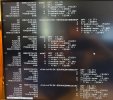
What I see with a gpart show -p ada0: (had to write it down and type it in, so not quite verbatim)
ada0 P1 efi media 260M
P2 efi 512K gptboot freebsd-boot
p3 freebsd swap 2.0 GB
p4 zfs 0 3.7 TB
And the same for ada1 and ada2. I'm guessing try to get things working on one SSD, then if good do the others so booting works if a drive fails ?

So TIA, and perhaps a heads-up as to the "you might need to update the boot code" can be added to the zpool status output.
 
Boot using USB 14.1-RELEASE stick
Select "Live System"
Login with Root without password
Identify your disk, EFI system partition (ESP) and boot partition (freebsd-boot) using
gpart show
As you have both ESP and legacy BIOS (freebsd-boot) partition check what do you want to update.
If you system is using UEFI then it boot via efi partition
if you system is using BIOS then it boot via freebsd-boot partition
sysctl -a | grep bootm

UEFI


mkdir /tmp/ESP
mount -t msdosfs /dev/ada0p1 /tmp/ESP
cp /boot/loader.efi /tmp/ESP/efi/boot/bootx64.efi
umount /tmp/ESP


BIOS

Double check if your freebsd-boot is ada0p2 (index 2) and your disk schema is GPT using gpart show
The following command will install the boot code into "-i 2"

/sbin/gpart bootcode -p /boot/gptzfsboot -i 2 ada0

 
The "BIOS" instructions appeared to be accepted OK, got
partcode written to ada0p2

For the "UEFI" part, the mount failed showing:
mount_msdosfs: /dev/ada0p1: Invalid argument

The BIOS shows that it can see the 3 drives (ada0-2) with the partitions shown in my original posts. I'mshow also shows those same partitions. The BIOS is set up to try UEFI, and then fall back and try BIOS. However it can't find anything to boot off of, and ends up trying to boot off the net (last options in the fall-back list).

I'm not sure what shape those first two partitions are in right now. I'll read up some more on all this, but time wise a "start from scratch with full install" might be the best bet.
I do appreciate your response ! This business of boot partitions just seems to be a bit obtuse.
 
I was typing from memory, here's the screen shot. Limited by VGA only screen resolution and keyboard only input... here's what the gpart showed (picture of screen).
 

Attachments

  • 20241111_104812.jpg
    20241111_104812.jpg
    479.7 KB · Views: 523
It's appear that ada0 doesn't have valid FAT filesystem on the EFI partition.

Try again to mount ada0p1

mkdir /tmp/ESP
mount -t msdosfs /dev/ada0p1 /tmp/ESP

IF you can't mount it then format it and create a new FAT32 with the following:
newfs_msdos -F 32 -c 1 /dev/ada0p1
mount -t msdosfs /dev/ada0p1 /tmp/ESP
mkdir -p /tmp/ESP/EFI/BOOT
cp /boot/loader.efi /tmp/ESP/EFI/BOOT/BOOTX64.efi
umount /tmp/ESP

You need to repeat this for all disk AFTER successful boot from the ada0.

It's better to leave the UEFI only as boot method on the bios. You don't need Legacy BIOS.
 
will try that. I set the boot to legacy only, and it started to boot of the SATA drives, then saw this (pix enclosed)

20241111_123631.jpg
 
Yes your /dev/ada0p1 doesn't have valid FAT32. You need to reformat it as my previous post.

I suspect that your initial installation was on another drive which was detected as ada0 but now they are ada1 or ada2. Previously the bsdinstall format only the first drive ESP and for the other drivers it create only ESP partition without formatting and copy the bootx64.efi on them. So you may want to check what you have on the other ESP partitions on ada1 and ada2 and fix them too.
 
Apparently the issue was indeed the p1 partition was not a valid FAT32. I set the BIOS to EFI only, and the system boot
I then set the bios to LEGACY only and it booted, presumably off the P2 partition.
This was interesting: The EFI / p1 boot had the older "character picture" boot screen, where as the LEGACY boot had the full graphics, image for Beastie screen. I guess I would have assumed that the EFI boot, being newer, would also have the better screen size setting and "picture". Does it even matter ? Please advise.

It seems there is not a single conclusion "out there" on EFI vs Legacy. It looks like your position is that EFI is best, it is what is up and coming, and no need for legacy.
Looking at what happened when I booted off of legacy, it looks like if you boot legacy and your P1 EFI partition is not formatted in FAT32 then the boot fails.

I will leave both p1 and p2 intact, and set up for boot EFI. Unless that is slower than Legacy, it seems like the correct way to go into the future. It sounds like I need to clean up the p1 and p2 partitions in ada1 and ada2 so that if my ada0 drive fails, I can remove it and still boot up.
I will also read again the sections in the manual. Hopefully I have a better feel for things and with that additional contextual knowledge the manual pages will make more sense. This problem does seem like it is asking for a utility program to figure all this out, but from all the posts I have seen there seems to be a lot of different scenarios to fail that can happen so perhaps it is not that easy.

I assume I can configure the other partitions when up and running "normally"/multiuser? Please advise.

Thank you so much for your help, I'll do a closing post when all the drives are happy.
 
Yes you can do the others ESP partition in multiuser not from the LiveCD.

It's better to use UEFI.
bsdinstall doesn't format the other ESP partitions with the FAT32 filesystem it only create the partition scheme.
Normally the installer create it like this:
/efi/boot/bootx64.efi
/efi/freebsd/loader.efi

both bootx64 and loader.efi are the same file. /efi/boot/bootx64.efi is the file which the UEFI is booting when there's no other EFI variables set in the UEFI. It's something like default boot if no other .efi files are specified.

You can create a boot entry using efibootmgr like that
mount the /tmp/ESP then
efibootmgr -a -c -l /tmp/ESP/efi/freebsd/loader.efi -L FreeBSD
OR specify the default one like this:
efibootmgr -a -c -l /tmp/ESP/efi/boot/bootx64.efi -L FreeBSD-14

This will create a UEFI boot entry with label FreeBSD and it will look for /efi/freebsd/loader.efi file on the ESP partition. It's normal all path and files on the ESP to be with small letters. ESP partition is NOT FAT16/32 it's a custom derivate from FAT file system.

When you create a new BOOT entry in the UEFI it will pick the GPT GUID of the disk and it doesn't matter where it was mounted. You can list all current entries via the UEFI bios or withing the OS using efibootmgr(8)
 
Everything boots OK now. The only quirk is the FreeBsd boot page which is displayed with characters at low resolution and not the higher resolution (looks like 1920x1080) where the FreeBsd logo is an image, not characters. Once the boot log starts, the resolution is OK. The version on the other server that was a start from scratch 14.1 off the USB stick is the higher quality image. It's OK, suspect it's just an artifact of the sever of focus today being a big upgrade vs. start from scratch.

I have a much better understanding of the boot environment, and will be looking at the manual pages again. I've made notes of what was done, and saved this discussion.

Thanks so much to VladiBG and tingo for the help !
 
Back
Top