
You are using an out of date browser. It may not display this or other websites correctly.
You should upgrade or use an alternative browser.
You should upgrade or use an alternative browser.
Home Lab
- Thread starter balanga
- Start date
Protectli Vault FW6E with coreboot bios running opnsense bare metal.What have you got on your Home Lab
Protectli Vault Pro VP6670 with coreboot bios running proxmox with shitload of LXCs and VMs.
Grandstream Switch GWN7816P.
Teltonika RUTC50 running stock firmware and serving as 5G network failover.
4 x Grandstream GWN7665 ceiling mounted access points all over the house.
Some Nokia garbage ONT provided by ISP with 10G internet.
Eaton 9SX UPS.

It seems that FreeBSD 14 / 15 changed a lot.Big server and a pool of machines that boot via PXE (diskless).
Also tftpd changed, paths need now a / at the beginning. Please, look at my thread.
I hope the flexibility of booting with PXE is not lost.

patmaddox
Developer
Big server and a pool of machines that boot via PXE (diskless).
Each physical machine can boot any of the OS installs based on what the server says, there is no fixed assignment.
I've never done PXE before... can you talk a bit more about the basic setup? I guess the big server exposes boot disks, and the other machines point to them?

cracauer@
Developer
No, the server in this setup doesn't export boot disk images (that would be iSCSI).I've never done PXE before... can you talk a bit more about the basic setup? I guess the big server exposes boot disks, and the other machines point to them?
PXE is firmware that knows how to interpret a software loading location from a DHCP server. That location is on a tftp server. In the FreeBSD model a special FreeBSD program "pxeboot" is loaded from tftp. The DHCP answer had additional parameters passed. That is used to verklicker the "pxeboot" program where the root filesystem will be. It then accesses that root directory over NFS to load the kernel. It passed the root filesystem location to the kernel, which mounts it. At that point you have a bootable system, the kernel just calls init.
The Linux pxeboot sequence is slightly different.

It is being build...
Steal my minimalist look >
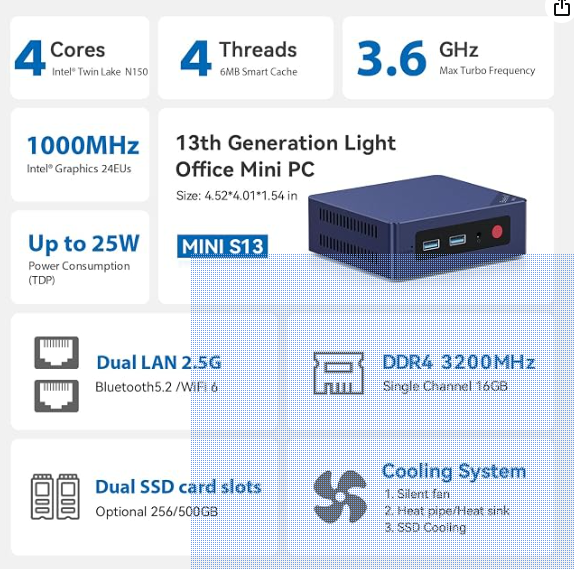
It will have Proxmox, tho. I need to pass-through Zigbee USB antenna to Home Assistant VM and another USB as speaker.
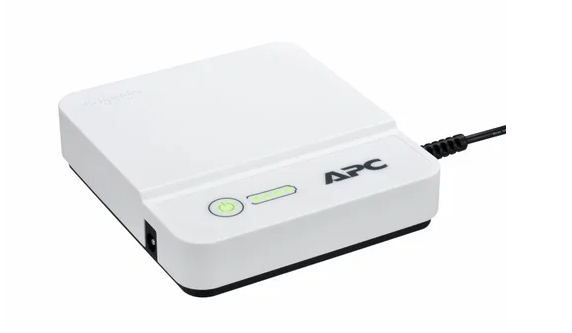
But the master move is buying little UPS for this. (have to figure out how to switch off safely the Home Assistant when it detects power outage and triggers delayed powerdown on proxmox host before it goes).
Next (after few weeks of flipping burgers) goes OPNSense Firewall on this:
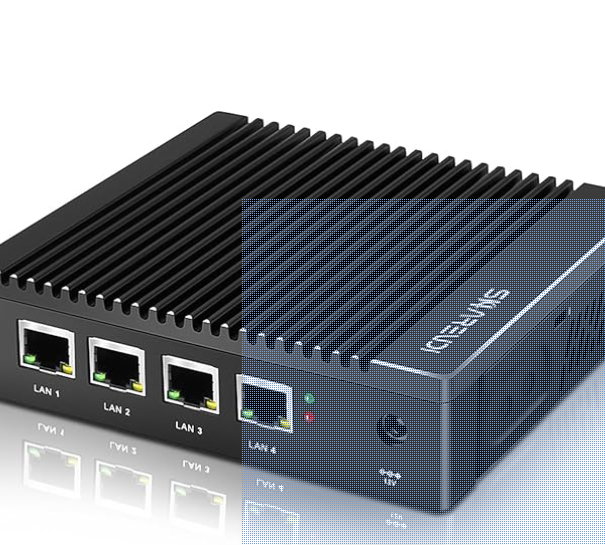
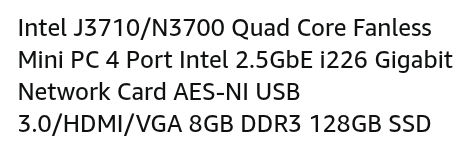
Not sure if it will cool well. Similar fanless setups can fry eggs sometimes. I will have to investigate further. But getting 5xLAN box is very difficult in here.
Total under 1 000 USD.
Some UGREEN reinstalled with FreeBSD will probably serve as NAS....but that will be pricey.
Steal my minimalist look >
It will have Proxmox, tho. I need to pass-through Zigbee USB antenna to Home Assistant VM and another USB as speaker.
But the master move is buying little UPS for this. (have to figure out how to switch off safely the Home Assistant when it detects power outage and triggers delayed powerdown on proxmox host before it goes).
Next (after few weeks of flipping burgers) goes OPNSense Firewall on this:
Not sure if it will cool well. Similar fanless setups can fry eggs sometimes. I will have to investigate further. But getting 5xLAN box is very difficult in here.
Total under 1 000 USD.
Some UGREEN reinstalled with FreeBSD will probably serve as NAS....but that will be pricey.

Dual Xeon E5620 - 96 GB ECC DDR3 - 2 * Intel 320 SSD - 4 * SAS 600 GB 10K rpm
Dual Xeon E5-2667 - 192 GB ECC DDR3 - 1 * Intel 320 SSD
Intel Core i5-3470 - 16 GB DDR3 - 1 * Intel 320 SSD - 3 * 1 TB 7200 RPM SATA - 4 * 3 TB 5400 RPM SATA
Intel Core i3-13100 - 16 GB DDR4 - 512 GB NVMe
And a bunch more random stuff.
Dual Xeon E5-2667 - 192 GB ECC DDR3 - 1 * Intel 320 SSD
Intel Core i5-3470 - 16 GB DDR3 - 1 * Intel 320 SSD - 3 * 1 TB 7200 RPM SATA - 4 * 3 TB 5400 RPM SATA
Intel Core i3-13100 - 16 GB DDR4 - 512 GB NVMe
And a bunch more random stuff.

meaningAnd a bunch more random stuff.
1 ex soviet nuclear reactor in the basement

Yep, that's what keeps the netherlands dry. De Blanke Hans is afraid to come any closer.meaning
1 ex soviet nuclear reactor in the basement
That's my UPS1 ex soviet nuclear reactor in the basement


I have a 16 SSD hotswap bay for it, fits in an 2x5.25" external drive bay. I intended to add 8 x 2 (or 4) TB SATA SSDs (RAID-Z2). Wanted to get rid of all those spinning rust disks and consolidate. But that idea got shelved, I can't afford it with today's pricing.Dual Xeon E5-2667 - 192 GB ECC DDR3 - 1 * Intel 320 SSD

I hesitated for a long time before setting up a small home lab, but I finally took the plunge by creating my own local server for my code repository. Everything is second-hand equipment:

- Laptop HP ZBook 15G3 i7-6500, RAM 8 Go, FreeBSD 16.0 ZFS
- Work station HP Z600 dual Xeon X5570, RAM 16 Go, FreeBSD 15.1 ZFS mirror 2xSSD 220 Go
- Server headless Dell Precision 3650 i7-10700, RAM 16 Go, FreeBSD 16.0 (I know it's a mistake for a server) ZFS mirror 2xSSD 128 Go
- Switch Netgear GS308
- APC Smart UPS 1000